

According to Panopto research, knowledge loss costs businesses an average of $47 million annually per 1,000 employees. Critical information lives in individual inboxes, scattered documents, or employees’ heads. The result? Wasted time, duplicated efforts, and institutional memory that walks out the door during turnover. According to CAKE.com’s 2025 knowledge management statistics, 47% of professionals spend 1–5 hours every day just searching for specific information.
A Knowledge Management System (KMS) creates a centralized platform where teams can capture, organize, and access the collective knowledge that drives better decisions and faster execution.
This guide covers what you need to understand, evaluate, and implement a KMS—from core concepts and system types to practical implementation steps and the pitfalls that sink most projects.
Table of Contents
Knowledge Management Systems Essentials
- What is a KMS? → A centralized platform that captures, organizes, and distributes organizational knowledge across teams
- Why it matters → Employees waste 20-30% of their time searching for information; KMS eliminates this productivity drain
- Who needs it? → Mid-to-large organizations (100+ employees), distributed teams, or customer support teams with high inquiry volumes
- Core types → Internal knowledge bases, document management systems, collaboration platforms, customer self-service portals
- Implementation key → Start with clear goals and change management plan; technology alone doesn’t solve knowledge hoarding
What Is a Knowledge Management System?
A knowledge management system (KMS) is a technology platform that captures, organizes, stores, and distributes an organization’s collective knowledge so employees and customers can quickly find accurate information when they need it. Well-designed knowledge management systems combine tools and processes to turn scattered information into a structured, searchable source of truth that supports better decisions and faster execution.
How Knowledge Management Systems Work

KMS platforms operate through four core functions:
- Capture – Collect knowledge from employee expertise, documents, customer interactions, project learnings, and institutional processes
- Organize – Structure information with categories, tags, and metadata. Modern systems use AI to auto-categorize and suggest connections
- Share – Make knowledge accessible through search, recommendations, and integration with daily tools like Slack or Microsoft Teams
- Maintain – Keep content current through versioning, audit workflows, and feedback loops that flag outdated information
According to APQC’s knowledge management framework, effective KM requires both technology infrastructure and cultural practices that encourage knowledge sharing rather than hoarding. The platform alone won’t change behavior.
Knowledge Management System vs Knowledge Base
People often use “knowledge management system” and “knowledge base” interchangeably, but they are not the same.
| Type | Scope | Includes | Best for | Examples |
|---|---|---|---|---|
| Knowledge Management System (KMS) | Broad platform combining processes, tools, governance, and culture | Workflows, automation, user permissions, analytics, knowledge base | Enterprise-wide knowledge strategy | Guru, Confluence, Bloomfire |
| Knowledge Base | Specific tool focused on a searchable content repository | Articles, FAQs, documentation | Self-service support or internal Q&A | Zendesk Help Center, Help Scout Docs |
A knowledge base is often one part of a broader KMS, but a KMS encompasses the entire strategy for how knowledge is captured, governed, and maintained—not just where it’s stored.
Explicit vs Tacit Knowledge: Why It Matters
Understanding knowledge types shapes how you design your KMS:
Explicit Knowledge is documented and easily transferred—procedures, product specs, data reports, training manuals. Most KMS excel here because the information already exists in shareable formats.
Tacit Knowledge lives in people’s heads. Judgment calls. Relationship insights. Problem-solving intuition. This is harder to capture and requires deliberate practices
Implicit knowledge is applied knowledge that could be documented but hasn’t been yet. It shows up in the way experienced employees handle edge cases, prioritize tasks, or adapt processes in real situations. A strong KMS helps surface and capture this implicit knowledge before it’s lost.
To capture tacit and implicit knowledge, you can use practices like:
- Structured knowledge harvesting sessions: Record interviews with subject matter experts focused on decision-making processes and edge cases they’ve learned to handle
- Mentorship pairing with documentation expectations: Pair junior and senior employees with explicit requirements to document lessons learned
- Community forums that convert Q&A into articles: Platforms like Stack Overflow for Teams turn common questions into searchable knowledge
- Video walkthroughs of expert processes: Capture screen shares showing “how” experts work, not just “what” they produce
- After-action reviews with structured templates: Document why decisions were made, what alternatives were considered, and outcomes that resulted
Here’s the reality: Most KMS focus on explicit knowledge because it’s easier. If tacit knowledge sharing is your priority, you’ll need dedicated processes and cultural incentives beyond installing software.
Types of Knowledge Management Systems
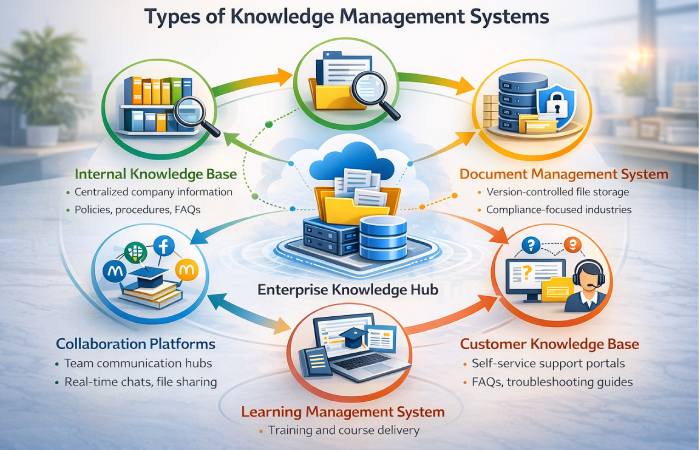
Different KMS types serve distinct organizational needs. Here’s a breakdown:
Internal Knowledge Bases
What it is: Centralized repositories for company policies, procedures, product documentation, and institutional knowledge.
Best for: Organizations needing a single source of truth for internal information—HR policies, IT troubleshooting guides, operational procedures.
Examples: Confluence, Notion, SharePoint
Document Management Systems (DMS)
What it is: Platforms focused on storing, versioning, and organizing documents with strong access controls.
Best for: Industries with heavy compliance requirements (legal, finance, healthcare) or teams managing large document volumes.
Examples: SharePoint, M-Files, DocuWare
Collaboration Platforms
What it is: Real-time communication tools with searchable message history, file sharing, and integration capabilities.
Best for: Distributed or remote teams needing to capture conversational knowledge and connect it to project work.
Examples: Slack, Microsoft Teams, Workplace by Meta
Customer-Facing Knowledge Bases
What it is: Self-service portals where customers find answers to common questions, troubleshooting guides, and product documentation.
Best for: Customer support teams handling high inquiry volumes with repetitive questions.
Examples: Zendesk Guide, HubSpot Knowledge Base, Help Scout Docs
Learning Management Systems (LMS)
What it is: Platforms designed for training, onboarding, and skills development with course content and progress tracking.
Best for: Organizations with structured training programs, compliance requirements, or ongoing professional development needs.
Examples: Docebo, TalentLMS, Cornerstone OnDemand
Research and Insight Libraries
What it is: Repositories for market research, consumer insights, competitive intelligence, and strategic analysis materials.
Best for: Marketing, product, and strategy teams that generate and consume research reports, customer interviews, and market data.
Examples: Bloomfire (with video transcription), Dovetail, Airtable
Enterprise-Wide Knowledge Management Systems
What it is: Comprehensive platforms that integrate multiple KMS types into one unified system serving all departments.
Best for: Large enterprises (500+ employees) with complex, cross-functional knowledge needs and existing tool sprawl.
Examples: Bloomfire, Guru, ServiceNow Knowledge Management
KMS Types Comparison Table
| Type | Primary Purpose | Best For | Knowledge Focus |
|---|---|---|---|
| Internal Knowledge Base | Centralized company information | All-purpose organizational knowledge | Explicit |
| Document Management System | Version-controlled file storage | Compliance-heavy industries | Explicit |
| Collaboration Platform | Real-time team communication | Distributed/remote teams | Tacit + Explicit |
| Customer Knowledge Base | Self-service support | High-volume customer inquiries | Explicit |
| Learning Management System | Training and onboarding | Structured skills development | Explicit |
| Research Library | Market insights and analysis | Marketing, product, strategy teams | Explicit |
| Enterprise-Wide KMS | Unified cross-department system | Large organizations (500+) | Tacit + Explicit |
Key Benefits of Knowledge Management Systems

Reduced Search Time and Improved Efficiency
According to McKinsey research, employees spend 1.8 hours every day—nearly 20% of their workweek—searching for information they need to do their jobs. That’s two hours out of every eight-hour day. A well-implemented KMS eliminates this productivity drain.
How it works: AI-powered search surfaces relevant answers instantly. Tagging and metadata ensure information is organized logically. Instead of digging through email chains or asking colleagues the same questions repeatedly, employees find answers in seconds.
Measurable impact: Organizations typically see 25-40% reduction in time spent searching within six months of KMS implementation.
Enhanced Collaboration Across Teams
Information silos prevent teams from learning from each other’s expertise. A KMS breaks down these barriers.
How it works: Centralized platforms make knowledge visible across departments. Marketing can access product team documentation, sales can reference customer success case studies, and new hires can learn from past project retrospectives.
Real-world example: When Slack implemented their own platform as a knowledge hub, cross-functional projects accelerated because teams could instantly access shared context rather than scheduling meetings to exchange information.
Better Decision-Making with Accessible Insights
Research from MIT Sloan Management Review shows that organizations lose critical knowledge during employee turnover without proper capture systems. KMS preserves institutional memory.
How it works: Past decisions, project outcomes, and lessons learned remain accessible even after team members leave. New leaders can review historical context before making strategic choices.
Measurable impact: Faster decision cycles (15-25% reduction in time-to-decision) because teams don’t need to rediscover information or repeat past mistakes.
Improved Onboarding and Training
New employees typically take 8-12 weeks to reach full productivity. KMS accelerates this timeline.
How it works: Structured knowledge bases provide self-service access to onboarding materials, process documentation, and training resources. New hires can answer their own questions without interrupting team members.
Measurable impact: 30-50% faster onboarding and reduced repetitive training workload for existing employees.
Increased Customer Satisfaction
Customer-facing KMS enable self-service support, reducing ticket volumes and resolution times.
How it works: Customers access troubleshooting guides, FAQs, and product documentation 24/7 without waiting for support agents. When customers do contact support, agents use internal KMS to find accurate answers faster.
Measurable impact: Organizations report 40-60% reduction in support tickets and 20-30% improvement in customer satisfaction scores after implementing self-service knowledge bases.
How to Measure KMS ROI
Before implementing a KMS, define how you’ll track success:
Time-to-answer metrics – Compare average time to resolve inquiries or complete tasks before and after KMS deployment. Track both internal (employee questions) and external (customer support tickets). A baseline measurement in month zero establishes your improvement benchmark.
Content reuse and access frequency – Monitor which articles are accessed most often and by which teams. High reuse rates indicate valuable content; zero-access content reveals gaps or poor discoverability. This metric also identifies subject matter experts whose knowledge should be captured.
Support ticket deflection rate – For customer-facing KMS, measure percentage of inquiries resolved through self-service versus agent-assisted. Benchmark against pre-KMS baseline. Each deflected ticket represents cost savings (average support interaction costs $5-15).
Training time reduction – Track new hire time-to-productivity before and after KMS. Include cost savings from reduced training hours for existing employees. If onboarding drops from 12 weeks to 8 weeks, calculate the productivity gain across all new hires annually.
Employee satisfaction and search success rate – Survey employees quarterly on KMS usefulness. Track percentage of searches that result in users finding and engaging with content (not abandoning after zero results). Low success rates indicate taxonomy or content gaps requiring attention.
Essential Components of a Knowledge Management System
Modern KMS platforms share core technical capabilities:
Centralized Knowledge Repository
A unified storage layer that houses all content types—documents, videos, images, links, conversations—in one searchable location. This eliminates the need to check multiple tools or ask “Where did we save that file?”
What to look for: Multi-format support, bulk upload capabilities, folder/category structures that mirror your organization’s logic.
AI-Powered Search and Retrieval
Traditional keyword search fails when users don’t know exact terminology. AI-powered semantic search understands intent and context.
How it works: Natural language processing (NLP) interprets queries like “how do we handle refund requests from enterprise customers?” and surfaces relevant policies, past cases, and decision trees—even if those exact words don’t appear in the content.
Critical feature: Auto-suggest and related content recommendations guide users to information they didn’t know existed.
Content Creation and Authoring Tools
KMS should make it easy for subject matter experts to contribute knowledge without technical barriers.
What to look for: WYSIWYG editors, templates for common content types (SOPs, troubleshooting guides, FAQs), collaborative editing with version control, approval workflows for sensitive content.
Access Control and Security
Not all knowledge should be universally accessible. Following NIST’s role-based access control guidelines, robust KMS platforms implement RBAC to restrict information based on job function and security requirements.
What to look for: Granular permissions (department, team, role-based), audit trails showing who accessed what and when, compliance certifications (SOC 2, GDPR, HIPAA if needed).
Analytics and Performance Tracking
You can’t improve what you don’t measure. KMS analytics reveal how knowledge is used and where gaps exist.
Key metrics to track:
- Most/least accessed articles
- Search queries with zero results (content gaps)
- Time-to-answer trends
- User engagement and feedback scores
- Content age and last-updated dates
KMS Readiness Framework: Are You Really Ready for a KMS?
Before you invest in a knowledge management system, it helps to check whether your organization is actually ready—and what type of system fits best. Use this simple KMS Readiness Framework.
| Question | If Yes → | If No → |
|---|---|---|
| Do you have 10+ people regularly searching for recurring information? | Proceed with a dedicated KMS | Start with a simple shared doc or wiki |
| Do you have a knowledge owner or champion to govern the system? | Proceed | Assign one before selecting a tool |
| Is knowledge loss a current business risk (e.g., key employees leaving)? | High priority to implement a KMS | Medium priority—revisit as you scale |
| Do you need structured training delivery, not just documentation? | Consider adding or integrating an LMS | A standard KMS is sufficient |
| Do you need AI-driven contextual delivery (within Slack, CRM, etc.)? | Consider an AI-powered KMS | A standard knowledge base may be enough |
If you’re consistently answering “Yes” in three or more rows, a KMS will likely deliver clear value. If most answers are “No,” start smaller with better documentation habits and a lightweight internal knowledge base, then evolve into a full KMS over time.
How to Implement a Knowledge Management System
Define Your Knowledge Management Goals
Start with specific, measurable objectives rather than vague “improve knowledge sharing.”
Good goals:
- Reduce average support ticket resolution time by 30%
- Cut new employee ramp-up time from 12 weeks to 8 weeks
- Decrease “where is this document?” Slack messages by 50%
Framework: Identify your top 3 knowledge pain points—where does lack of accessible information hurt most? Let those pain points drive your KMS scope and success metrics.
Assess Current Knowledge Assets and Gaps
Audit what knowledge already exists and where it lives:
- What information do employees ask for repeatedly?
- Which documents are accessed most frequently?
- Where is critical knowledge trapped? (Individual computers, email, specific people’s expertise)
- What knowledge is lost when employees leave?
Output: A knowledge inventory mapping existing assets and priority gaps to fill first.
Choose the Right KMS Platform
Match system capabilities to your organization’s needs:
For small-to-mid teams (20-200 employees): Start simple with Notion, Confluence, or Slite. Avoid over-engineering.
For customer support focus: Zendesk Guide, HubSpot Knowledge Base, or Freshdesk with specialized self-service capabilities.
For enterprise complexity (500+ employees): Bloomfire, ServiceNow KM, or Microsoft SharePoint with strong search and integration.
Evaluation criteria: Search quality, ease of content creation, integration with existing tools (Slack, Teams, CRM), mobile access, analytics depth.
Build Your Content Library
Start with high-impact, frequently needed knowledge:
- Phase 1 (Weeks 1-4): Migrate most-accessed content—onboarding docs, common troubleshooting guides, key policies.
- Phase 2 (Months 2-3): Capture tacit knowledge through interviews with subject matter experts, recorded walkthroughs, FAQ documentation.
- Phase 3 (Ongoing): Establish content creation workflows so knowledge capture becomes automatic, not a one-time project.
- Critical success factor: Assign content owners for each major category to ensure accountability and maintenance.
Drive Adoption Through Change Management
This is where most implementations fail. Buying software doesn’t solve cultural resistance to knowledge sharing.
Adoption tactics:
- Executive sponsorship: Leadership must visibly use and promote the KMS, not just mandate it
- Incentivize contribution: Recognize and reward employees who share valuable knowledge
- Reduce friction: Integrate KMS into daily workflows rather than creating separate “knowledge management time”
- Train champions: Identify enthusiastic early adopters in each department to evangelize and support peers
Reality check: Expect 6-12 months before KMS becomes embedded in organizational habits. Quick wins—solving a common pain point immediately—build momentum.
Best Practices for Knowledge Management Systems
Keep Content Updated and Audit Regularly
Here’s the risk: Without governance, your KMS becomes a graveyard of outdated information. Trust evaporates. Teams stop using it.
The practice: Schedule quarterly content audits. Review high-traffic articles. Archive obsolete content. Update changed processes.
Practical tip: Use KMS analytics to identify stale content (not accessed in 6+ months) and tag articles with “last reviewed” dates. Visible freshness signals build trust.
Foster a Culture of Knowledge Sharing
In many organizations, employees quietly hoard knowledge for job security, so leadership needs to clearly reward sharing and make contribution part of performance expectations.
Foster a Culture of Knowledge Sharing
Here’s the reality: In competitive environments, employees hoard knowledge for job security. Technology can’t fix that.
The practice:
- Make knowledge contribution part of performance reviews
- Publicly celebrate employees who share valuable insights
- Create “office hours” where experts answer questions that get documented in KMS
- Frame sharing as collective success: “All boats rise with the rising tide”
Ensure Findability with Strong Taxonomy
The misconception: AI search eliminates the need for good information architecture.
The reality: AI search works best when content is well-structured with clear categories and metadata. Poor taxonomy = poor AI results. Modern AI-powered KMS can even deliver answers directly inside tools like Slack or Salesforce, so employees get the right information in context without switching apps.
The practice: Design a taxonomy that mirrors how your teams think about information (by function, by project type, by customer journey stage). Test it with actual search scenarios before rolling out.
Integrate with Existing Workflows
The reality: If using KMS requires switching tools or breaking workflow, adoption will fail.
The practice: Connect KMS to where work already happens:
- Slack/Teams integrations for in-context search
- CRM integrations so sales teams access case studies without leaving Salesforce
- Email integrations for saving valuable knowledge directly from conversations
Example: Bloomfire’s Slack integration lets employees search the knowledge base without opening a browser—reducing friction means higher usage.
Common Mistakes to Avoid When Implementing a KMS
- Mistake 1: Treating KMS as a one-time project
The reality: Knowledge management is an ongoing process. Without continuous content updates and governance, your KMS decays into uselessness within 12-18 months. - Mistake 2: Over-engineering for current needs
The reality: Small teams (<50 employees) often don’t need enterprise platforms. Start simple (Google Docs + clear folder structure) and scale as complexity grows. - Mistake 3: Ignoring change management
The reality: 40-60% of KMS implementations fail due to low adoption, not technical issues. The platform works fine. People just don’t use it. Budget time and resources for training, incentives, and culture building—not just software licenses. In many teams, employees quietly hoard knowledge for job security, so you need leadership to clearly reward sharing and make contribution part of performance expectations. - Mistake 4: Migrating everything at once
The reality: Bulk content migration creates low-quality knowledge bases. Start with high-impact content and expand iteratively based on actual usage patterns. - Mistake 5: No content ownership model
The reality: Without clear owners responsible for maintaining specific content areas, information becomes outdated and inaccurate—eroding trust in the system.
Who Should Use a Knowledge Management System (And Who Should Wait)
Best For:
- Mid-to-large organizations (100+ employees) – Knowledge silos form naturally at scale. KMS prevents information fragmentation across growing teams.
- Distributed or remote teams – Asynchronous work requires accessible documentation. KMS replaces “tap on the shoulder” knowledge transfer.
- Customer support teams with repetitive inquiries – Self-service knowledge bases reduce ticket volume by 40-60%, freeing agents for complex issues.
- Industries with high turnover or compliance needs – Healthcare, finance, retail, and professional services benefit from knowledge retention and audit trails.
Not For (Or Proceed with Caution):
- Very small teams (<20 employees) – If everyone sits together and knowledge flows naturally through conversation, KMS may be premature. Start with simple shared drives.
- Organizations without content governance capacity – If you can’t commit resources to maintaining content quality, your KMS will become a liability. Outdated information is worse than no information.
- Teams without executive buy-in – KMS adoption requires top-down support. Without leadership modeling usage and rewarding contribution, cultural resistance will kill the initiative.
Final Verdict: Is a Knowledge Management System Worth It?
Yes—if you meet these conditions:
You have identifiable knowledge silos costing real time and money. Employees repeatedly ask the same questions. New hires take months to ramp up. Customer support drowns in repetitive tickets.
You can commit to ongoing maintenance and governance, not just initial setup.
You have executive sponsorship and change management capacity to drive adoption.
Start simple: A well-organized Notion workspace or Confluence space beats an unused enterprise platform. Match the system to your current complexity, then scale as needs grow.
The bottom line: Knowledge management systems deliver measurable ROI—25-40% reduction in search time, 30-50% faster onboarding, 40-60% fewer support tickets. But only when paired with strong processes and cultural commitment to knowledge sharing. The software is the easy part.
The global knowledge management software market is projected to grow from USD 20.15 billion in 2024 to USD 62.15 billion by 2033, reflecting how quickly organizations are investing in structured knowledge management.
Frequently Asked Questions About Knowledge Management Systems
Q: How would you define a knowledge management system?
A: A knowledge management system (KMS) is a technology platform that captures, organizes, and distributes an organization’s collective knowledge through a centralized, searchable repository so people can quickly find the information they need.
Q: What are the different types of Knowledge Management Systems?
A: Main types include internal knowledge bases (company documentation), document management systems (file storage and versioning), collaboration platforms (real-time communication with search), customer-facing knowledge bases (self-service support), and enterprise-wide systems that unify multiple functions.
Internal knowledge bases act as a centralized, searchable hub for employee-facing content like SOPs, onboarding guides, and internal FAQs.
Q: What are the key benefits of implementing a KMS?
A: Primary benefits include 25-40% reduction in time spent searching for information, improved cross-team collaboration, better decision-making with preserved institutional memory, 30-50% faster employee onboarding, and 40-60% reduction in customer support tickets through self-service.
Q: How does a Knowledge Management System work?
A: KMS platforms work through four stages: capturing knowledge from multiple sources, organizing it with taxonomy and metadata, sharing it through searchable interfaces and integrations, and maintaining content quality through versioning and audit workflows. Modern systems use AI to enhance search and auto-categorize content.
Q: What are the essential components of a KMS?
A: Essential components include a centralized repository for storing multi-format content, AI-powered search and retrieval, content creation tools with version control, role-based access control for security, and analytics to track usage patterns and identify content gaps.
Q: How do I choose the right Knowledge Management System?
A: Match the system to your organization’s size and primary use case. Small teams (20-200) benefit from simple platforms like Notion or Confluence. Customer support teams need specialized solutions like Zendesk Guide. Large enterprises (500+) require comprehensive platforms like Bloomfire or ServiceNow with strong integration capabilities.
Q: What challenges should I expect when implementing a KMS?
A: Top challenges include cultural resistance to knowledge sharing (employees hoarding information), low adoption rates without change management, content governance difficulties (outdated information accumulation), and integration complexity with existing tools. Budget 6-12 months for full organizational adoption.
Q: How does AI improve Knowledge Management Systems?
A: AI enhances KMS through semantic search that understands intent (not just keyword matching), automatic content categorization and tagging, recommended content based on user behavior and context, identification of knowledge gaps from unanswered searches, and proactive flagging of outdated content for review.