

Professional services teams juggle projects, people, time, and billing across multiple tools. PSA (Professional Services Automation) software pulls those workflows into one platform so you can see not just whether work is getting done, but whether it’s profitable.
Table of Contents
Quick answer
PSA software for project management combines project planning, resource scheduling, time and expense tracking, billing, and reporting in one system so service businesses can see both project progress and profitability in real time. It’s especially useful for agencies, consultancies, and IT services firms that bill clients for time or projects and need better control over utilization, margins, and cash flow.
Key takeaways
-
PSA software connects projects, resources, time, billing, and reporting in a single platform, giving service leaders real‑time visibility into profitability and utilization.
-
It’s most valuable for agencies, consultancies, and IT services firms that manage multiple client projects and bill for time, milestones, or retainers.
-
Teams usually outgrow basic project management tools when they can’t easily see who is available, which projects are profitable, or where billable hours are being lost—this is the point where PSA becomes worth adopting.
What Is PSA Software for Project Management?
PSA software is built for service‑based businesses that bill clients for time, projects, or expertise. It connects project planning, resource scheduling, time and expense tracking, billing, and reporting in a single system.
Unlike basic project management tools that focus mainly on tasks and collaboration, PSA software ties delivery data directly to utilization, revenue, and margins so leaders can monitor both project health and business performance.
In simple terms, PSA pulls project management, resource scheduling, time and expense tracking, and billing into one connected hub, very close to how leading providers define what PSA software is and what it includes.
Core Components That Go Beyond Project Tools
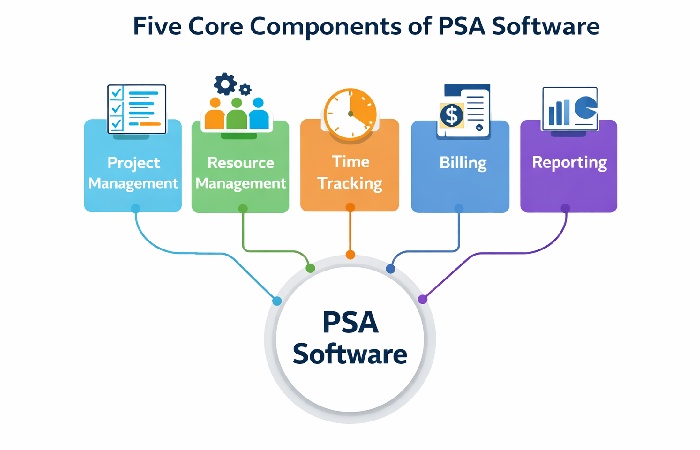
Most mature PSA platforms bring together several capabilities that are usually split across different apps:
-
Project management: Planning, task assignment, milestones, and workflows, with project data feeding into time, billing, and reporting.
-
Resource management: Capacity and utilization views that show who is available, overbooked, or underused, often with forecasting by role or skill.
-
Time and expense tracking: Billable and non‑billable time, tied to projects and rates, plus expense capture for accurate invoicing.
-
Billing and invoicing: Support for time‑and‑materials, fixed‑fee, retainers, and milestone billing, reducing manual reconciliation and revenue leakage.
-
Reporting and profitability: Dashboards for project and client profitability, utilization, and revenue forecasts so you can adjust before projects go off‑track.
This “single source of truth” replaces spreadsheets and disconnected tools with one shared view for project managers, operations, and finance.
Key Benefits of Using PSA Software for Project Management
1. Better visibility into profitability
PSA software lets you track budget vs. actuals, revenue vs. cost, and profitability at project, client, and portfolio levels. Instead of discovering margin issues after a project closes, you can see overruns forming early and adjust scope, staffing, or pricing in time.
Higher profitability and healthier client relationships often go hand in hand, as satisfied customers are more likely to stay, buy more, and recommend your services, a pattern supported by research on the link between customer satisfaction, loyalty, and performance.
2. Higher resource utilization and less bench time
Because PSA tools show who is working on what and at what capacity, managers can assign the right people to the right projects at the right time. For teams that bill for their time, understanding and tracking billable hours is crucial to avoiding revenue leakage and making sure utilization targets are realistic. Over time, improving how you schedule and bill work helps reduce bench time and supports healthier margins.
3. Faster, more accurate billing
When time, expenses, and project data live in the same system, invoices can be generated quickly and with fewer errors. PSA software helps catch unbilled time, incorrect rates, or missing expenses before invoices go out, reducing disputes and improving cash flow.
4. Stronger forecasting and decision‑making
Real‑time reports on pipeline, capacity, and revenue give leaders a clearer view of what’s coming next. With PSA, you can forecast demand, model staffing scenarios, and decide whether to hire, subcontract, or delay work based on data—not guesswork.
5. Less admin, more billable work
By automating repetitive tasks like timesheet reminders, invoice creation, and status reporting, PSA tools free teams to focus on client delivery. Over time, reducing non‑billable administrative work can materially increase revenue and margins.
Who Benefits Most from PSA Software?
PSA tools are designed primarily for organizations that sell services, not products. Typical users include:
-
Creative, marketing, and digital agencies
-
Management and IT consulting firms
-
IT services and managed service providers (MSPs)
-
Engineering, legal, accounting, and other professional services teams
PSA software is a strong fit when you:
-
Manage multiple client projects at once
-
Bill by time, project, milestone, or retainer
-
Need to track utilization and profitability, not just tasks
-
Rely on spreadsheets or disconnected apps for time, billing, and reporting
It’s often overkill if you run small, internal‑only projects, don’t track billable time, or have simple, low‑volume work that’s easy to manage in a standard project tool.
PSA Software vs. Traditional Project Management Tools
Project management tools focus on execution: tasks, deadlines, collaboration, and basic reporting. PSA software focuses on the business of services delivery—linking projects with resources, billing, and financial outcomes.
| Aspect | Project management tools | PSA software |
|---|---|---|
| Core focus | Tasks, deadlines, collaboration | Projects, resources, time, billing, and profitability |
| Time & expense tracking | Often basic or via add‑ons | Built‑in, tied to rates and invoices |
| Billing & invoicing | Rarely included | Core capability |
| Profitability reporting | Limited | Standard (project, client, portfolio) |
| Ideal users | Internal or mixed teams | Service businesses that bill clients |
How to Tell If Your Team Is Ready for PSA
You don’t need PSA software on day one, but certain warning signs suggest you’ve outgrown basic tools. If you’re unsure whether to make the jump, it can help to step back and look at the core advantages PSA brings to projects and margins; we cover this in detail in our guide to the benefits of PSA software for project management.
-
Frequent billing errors or disputes because time and invoicing live in separate tools
-
Inability to answer “Who is available next month?” without digging into spreadsheets
-
Limited visibility into which projects or clients are profitable
-
Missed billable hours due to inconsistent time tracking
-
Month‑end close taking days because finance is reconciling data from multiple systems
If most of these apply, PSA can reduce friction and unlock better decisions. If only one or two show up occasionally, strengthening your current processes may be enough for now.
How to Choose PSA Software
Choosing PSA software starts with your delivery reality, not a feature checklist. Begin by writing down your biggest problems today: missed billable hours, poor visibility into profitability, constant last‑minute staffing changes, or billing errors. From there, look at three things for each PSA you evaluate: how well it fits your current workflows, how easily it connects to tools you already rely on (like your CRM and accounting software), and whether it can scale with your expected client and team growth over the next few years. A PSA that fits your day‑to‑day work and is easy for your team to adopt will almost always beat a “powerful” platform that nobody wants to use.
Business Size and Complexity
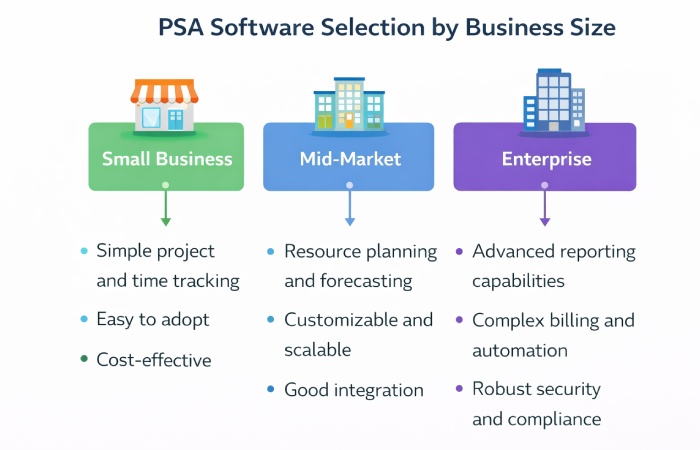
Your business size and complexity should heavily influence which PSA you choose. Smaller agencies and consultancies usually get more value from tools that are simple to set up, with clean time tracking, invoicing, and basic reporting, rather than heavy platforms that require months of configuration. Larger or more complex organizations—multiple locations, several service lines, strict revenue targets—tend to need deeper resource forecasting, stronger permissions, and more advanced financial reporting. As a rule, the more complex your projects and billing models are, the more you should prioritise configurability and integration over a long list of “nice‑to‑have” features.
Choosing PSA Software with Benefits in Mind
Instead of chasing the “most features,” focus on which benefits matter now:
-
If profitability and cash flow are your main issues, prioritize strong time tracking, billing, and margin reporting.
-
If capacity and burnout are the problem, look for robust resource planning and utilization dashboards.
-
If reporting and forecasting are weak, choose platforms with clear, prebuilt reports and easy exports your leadership will actually use.
Match tool complexity to your current size and maturity. Smaller teams usually benefit from simpler, easier‑to‑implement PSA tools, while larger organizations can justify more advanced platforms with deeper integrations and analytics.
Best PSA Software for Project Management
There is no single “best” PSA tool for every team, but there are clear signs of a strong fit. For project management, the best PSA platforms bring tasks, schedules, resource allocation, time and expenses, billing, and reporting into one view so project managers and leadership are working from the same data. When comparing vendors, prioritise ease of use for your delivery teams, the quality of implementation and support, and how well the tool fits businesses like yours, instead of chasing every advanced feature on the market. If you later decide to name specific tools, you can shortlist a few PSA platforms that match your size, industry, and tech stack and briefly explain what each is best for.
Industry‑specific PSA Software
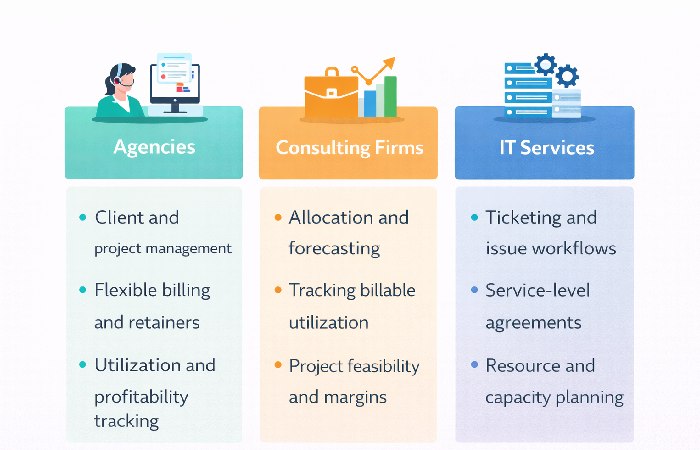
Different industries use PSA software in slightly different ways, even if the building blocks look similar. IT services and managed service providers care a lot about tickets, SLAs, recurring contracts, and bundling PSA with their helpdesk or RMM tools. Consulting firms and agencies are more focused on project profitability, utilisation, and margin by client or service line, along with strong forecasting. Engineering, legal, and accounting teams often need detailed time capture, compliance‑friendly records, and reports that match how they price and deliver work. When you evaluate PSA platforms, look for vendors that already serve your type of business and, ideally, offer industry‑specific templates, reports, or implementation experience.
Common Misconceptions and Pitfalls
PSA software is powerful, but it won’t fix broken processes by itself:
-
It cannot correct poor project scoping or unrealistic budgets; it only makes the impact more visible.
-
It fails if teams don’t adopt it—consistent time entry and project updates are non‑negotiable.
-
Over‑customizing from day one often slows adoption; starting with out‑of‑the‑box workflows is usually safer.
Treat PSA as an enabler of better habits, not a magic switch.
Conclusion: Is PSA Software Worth It for Your Projects?
PSA software for project management is most valuable when projects, people, and revenue are tightly connected and you need one place to manage all three. It delivers clearer profitability, better utilization, faster billing, and stronger forecasting than traditional project tools can provide on their own.
If you run a services business with growing delivery complexity, multiple clients, and billable work, PSA is often worth evaluating. Start by identifying your primary bottleneck—profitability visibility, capacity planning, or billing accuracy—then shortlist tools that solve that problem first. The best PSA platform is the one your team will actually adopt and that makes each project both easier to deliver and easier to profit from.
Here are tightened versions of those FAQs that still keep the important points and stay within a good length.
Frequently Asked Questions
Q: What’s the difference between PSA software and project management software?
PSA software combines project management with time tracking, billing, resource management, and financial reporting, so service businesses can manage both delivery and profitability in one place. Project management tools focus on tasks and collaboration only, making them better for internal or non‑billable work.
Q: Do I need PSA software if I already use QuickBooks and Asana?
If you have simple billing and only a few clients, QuickBooks plus a project tool may be enough. Once you’re juggling multiple clients, rates, and billable hours—and spending time reconciling spreadsheets—PSA software becomes useful because it connects projects, time, and billing instead of keeping them separate.
Q: Can PSA software integrate with my existing CRM?
Most modern PSA platforms integrate with popular CRMs and can pass deals into projects so handover from sales to delivery is smoother. Depth of integration varies by vendor, so it’s important to confirm whether you get simple data sync or a deeper, two‑way connection before buying.
Q: How long does it take to implement PSA software?
Smaller teams on lighter PSA tools can often go live in a couple of weeks, while mid‑market setups usually take a few weeks to configure, migrate data, and train users. Large or complex deployments, especially with custom integrations, can take several months.
Q: Is PSA software only for large companies?
No. PSA software can help small agencies as well as big global firms; the key factor is how complex your billing and projects are. If you bill clients for time or projects and need clear visibility into utilisation and profitability, PSA can be useful regardless of team size.
Author Bio
Marketingsguide content is written to be practical and easy to understand across topics like health, technology, business, marketing, and lifestyle. Each article is based mainly on reputable, publicly available information, with AI tools used only to help research, organise, and explain topics more clearly, keeping the focus on clear explanations and real‑world usefulness rather than jargon or unnecessary complexity.
Methodology
This article is based on available information from reputable industry sources, product documentation, and practical PSA use cases, and is organised to answer common questions in clear, plain language.
Disclaimer
This content is for general informational purposes only and is not professional, legal, financial, or technical advice; please evaluate it against your own situation and consult a qualified expert if needed.