

Web Browser Online Testing — also known as cross-browser testing — is the practice of verifying that a website or web application functions reliably, looks consistent, and delivers a seamless experience across different browsers, devices, and operating systems. In today’s diverse digital landscape, users access sites from a wide range of environments — from Chrome on desktop to Safari on mobile and everything in between. Without proper browser testing, visual bugs, broken interactions, and poor performance can undermine user trust, damage conversions, and hurt brand credibility.
In this guide, you’ll learn what browser testing is, why it matters, how to do it effectively, which tools to choose depending on your workflow, how to solve real compatibility problems, and how to avoid common pitfalls that slow down QA cycles. This article is designed to give you both the theory and actionable steps needed to build a robust cross-browser testing strategy that scales with your project.
Table of Contents
What Is Web Browser Online Testing?
Web browser online testing — widely known as cross-browser testing — is the process of verifying that a website or web application functions and appears correctly across a range of browsers, browser versions, devices, and operating systems.
This type of testing goes beyond simply checking whether a page loads. It also covers interactivity, layout rendering, JavaScript behavior, user interface components, and responsiveness across environments.
Why This Matters
Different browsers interpret HTML, CSS, and JavaScript in unique ways, and these differences can produce subtle (or not-so-subtle) inconsistencies that impact user experience and conversions.
Who Should Care About Browser Testing
Ideal audiences include:
-
Developers who build dynamic websites and applications.
-
QA teams responsible for release quality.
-
Designers focused on layout consistency.
-
Product managers and stakeholders ensuring broad user coverage.
Be cautious if:
-
Your site is extremely simple and only intended for a known, narrow audience.
-
You don’t have access to analytics data to prioritize test targets.
Why Browser Testing Matters
Cross-browser testing ensures that every user — regardless of browser choice or device — has a consistent and functional experience. Here’s why it’s essential:
For example, an ecommerce site might discover that its checkout button is perfectly aligned in Chrome and Firefox but pushed off‑screen in Safari on iOS, causing a sudden drop in conversions from iPhone users. In another case, a web app could work flawlessly on desktop Chrome, yet a JavaScript error stops a critical form from submitting in older versions of Edge, leading to silent failures that users rarely report but that directly impact sign‑ups.
🔹 Prevent Compatibility Bugs
Browsers use different rendering engines (Chromium, WebKit, Gecko), and this can lead to layout or script issues in some environments.
🔹 Improve User Experience
A problem in Safari might never be seen in Chrome — without testing, you’ll never know. Early detection boosts trust and reduces user frustration.
🔹 Reduce Support Load
Fixing bugs in production after real users encounter them is far more costly than catching them during development.
🔹 Broaden Accessibility & Reach
With users spread across multiple browsers and devices, compatibility is a quality baseline, not a luxury.
The Browser Testing Workflow (Step-by-Step)
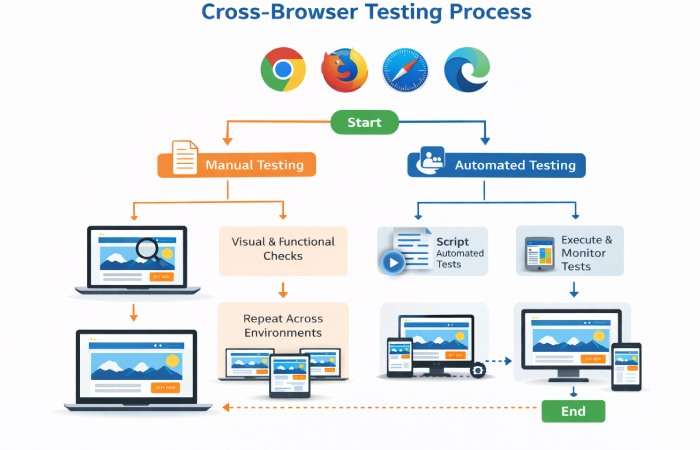
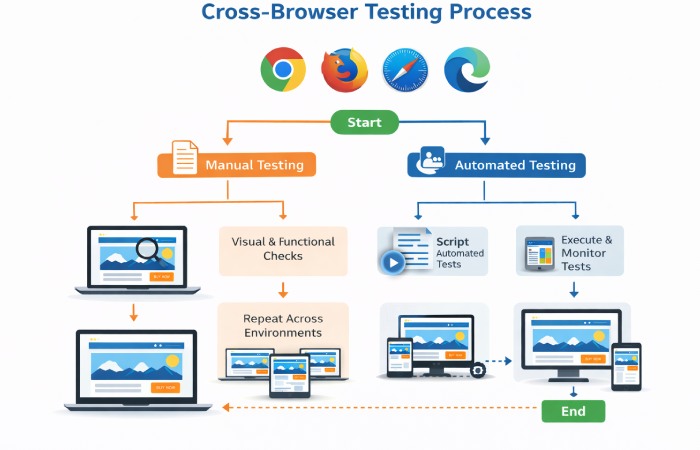
A real-world, practical cross-browser testing workflow typically comprises the following steps:
1. Audit Your Target Browsers
Before testing, identify which browsers and versions matter most using analytics. Start with tools like Google Analytics 4 (GA4) or your product analytics to see which browser, version, OS, and device combinations your real users rely on most. From that data, build a simple cross-browser testing matrix that ranks browsers and devices into tiers (must-test, should-test, nice-to-have), so your QA effort always follows real user distribution.
2. Set Up Your Environment
You can perform browser testing:
-
On local machines with installed browsers
-
On cloud platforms offering real device access
Cloud-based tools make it possible to test site on mobile and desktop across hundreds or thousands of browser–device combinations without maintaining physical labs.
3. Manual Testing (Critical First Pass)
Start with manual checks of key user flows — homepage navigation, form entries, shopping carts, login/logout — on priority browsers. Manual testing catches obvious UI and experience issues.
4. Build Automated Tests
For repeatable, regression testing, build automation scripts using frameworks or cloud tools. These scripts run tests across multiple environments without manual intervention.
5. Execute & Collate Results
Run tests — ideally in parallel — to save time. Review results, screenshots, and logs to pinpoint inconsistencies or failures.
6. Fix, Re-Test, & Integrate
After fixing issues, re-run tests. Integrate regular browser tests into your CI/CD pipeline for long-term quality.
Manual vs Automated Testing
| Aspect | Manual Testing | Automated Testing |
|---|---|---|
| Interaction Style | Human inspector via browser UI | Scripted tests across environments |
| Best For | Early visual checks & UX issues | Regression suites & frequent runs |
| Scalability | Limited | Highly scalable |
| Ideal Use Case | UI validation | CI/CD integration |
Manual testing is essential for early and visually nuanced checks, but automation is crucial for repeatable, scalable QA.
Best Browser Testing Tools in 2026
Here’s a curated set of tools to cover various testing needs:
Cloud-Based Platforms
These provide extensive browser, device, and OS combinations without infrastructure overhead.
-
BrowserStack: Broad real-device coverage and cloud automation support.
-
LambdaTest: Cloud-based cross-browser testing with real-time and automated runs on 3000+ browser–device combinations, including responsive and mobile testing, plus integrations with Selenium, Cypress, and Playwright.
-
Sauce Labs: Enterprise-grade testing infrastructure with wide browser support.
Automation Frameworks
These are scripts and libraries for automated testing:
-
Selenium: Widely used open-source framework for scripted tests.
-
Playwright: Modern, fast automation with built-in cross-browser support.
-
Cypress: Developer-friendly with real-time testing feedback.
Emerging & Specialized Options
-
TestGrid: Flexible testing with cloud and on-premise options.
-
Ranorex: Good for teams needing scriptless options.
-
AI-powered platforms (TestMu AI / Mabl / Virtuoso QA) that cut manual effort and increase coverage.
How to Choose the Right Tool
Selecting the right browser testing tool depends on:
-
Team size & skill level: Selenium is flexible but needs coding skills; cloud platforms abstract away infrastructure.
-
Frequency of testing: Automated tools are vital for regular regression tests.
-
Browser/device coverage needs: Cloud services provide the broadest matrices.
-
Budget & scalability: Open-source tools are free but may need more setup; cloud platforms scale with cost.
Best Practices & Common Mistakes
Best Practices
- Use analytics to prioritize browsers.
- Combine manual and automated testing for maximum coverage.
- Integrate browser testing into CI/CD pipelines.
- Automate visual regression tests to catch layout discrepancies.
Common Mistakes
- Limiting tests to a single browser.
- Neglecting mobile browser checks.
- Failing to keep browser lists updated with analytics insights.
Final Conclusion
Web browser online testing is essential for delivering reliable, consistent, and professional web experiences across every browser and device your users might choose. By combining analytics-driven prioritization, thoughtful workflows, and the right mix of tools, you can build a robust testing strategy that catches bugs early and keeps your releases smooth — helping you outrank competitors and build authority on this topic in 2026 and beyond.
FAQ Section
What is Web Browser Online Testing?
Web browser online testing — also called cross-browser testing — checks whether a website or web app works correctly and looks consistent across browsers, operating systems, and devices.
Why is cross-browser testing necessary?
It’s necessary because browsers interpret code differently; without testing, layout bugs, functional issues, or broken experiences may occur for users on certain browsers.
How do you perform cross-browser testing?
Perform cross-browser testing by prioritizing browsers with analytics, running manual tests for visual checks, scripting automated tests for repeatable verification, and fixing issues before release.
What are the best tools for browser testing?
Best browser testing tools include cloud platforms like BrowserStack and LambdaTest for broad coverage, and automation frameworks like Selenium for scriptable test execution.
How many browsers and devices should be tested?
Test across key browsers your users actually use, typically Chrome, Safari, Firefox, and Edge, plus relevant mobile browsers guided by user analytics and priority use cases.
When should I run browser testing in my workflow?
Run browser testing early — as part of development and QA cycles — and continuously with automation integrated into build or CI/CD pipelines to catch issues before they reach production.
What problems does browser testing detect?
Browser testing detects rendering mismatches, broken interactions, layout shifts, and functionality errors that may only appear in specific browsers or devices.