

Last updated: May 18, 2026
You searched “apkek org” because someone mentioned it pays you to download apps, or maybe a YouTube short promised easy earnings with no investment. And now you‘re looking at a homepage filled with shiny thumbnails of apps for making money, Free Fire tips, insurance advice, WhatsApp hacks, and can‘t decide whether to believe it or shut the tab.
Fair question. Honestly, this is one of those sites where the answer isn’t a clean yes or no.
Apkek.org is a multi-topic blog that mixes Android APK links, online-earning guides, and tech tips — but it lacks the transparency, verified ownership, and security signals you’d expect from a trusted app source. For Indian users, the bigger risk isn’t the website itself. It’s the third-party APKs and earning apps it points you toward.
This guide walks you through:
- What apkek.org actually is (and isn’t)
- Whether it’s safe to visit, browse, and download from
- The real story behind its “earn money online” promises
- A 7-point checklist to vet any APK before you install it
- Safer alternatives built for Indian Android users
Table of Contents
Key takeaways
- So is apkek.org a safe website to visit? Overall, yes, ScamAdviser ranked it at approximately 60/100 Trust Score (in May 2026), and we haven‘t observed any very prominent malware events associated with this domain. But “safe for browsing” is different than “safe for downloading,
- Is it a legit app store? No. It’s a blog with APK links, not a verified platform like the Google Play Store.
- Can you actually earn from the apps it lists? Some yes (Upwork, Fiverr). Many “no-investment” earning apps it promotes have no evidence of consistent payouts.
- Should Indian users trust it for APK downloads? Proceed with caution. Always verify file hashes and scan with VirusTotal.
- Better alternatives? APKMirror, APKPure, and the Play Store itself for 95% of needs.
What Is Apkek.org?
Apkek.org appears to focus heavily on India and Pakistan, publishing a mix of Android app reviews, APK download references, online‑earning tutorials, telecom hacks (mostly Jazz/Telenor for Pakistani readers), and general tech tips. It’s not an official app store. It’s not affiliated with Google or any registered software distributor.
The site positions itself as a one-stop hub for “free ways to earn money online” and “best Android apps.” Look closer, though, and you’ll notice something. There’s no About page with a named founder. No registered business address. No author bios on most posts.
That matters more than people realise.
A sister domain, apkek.com, runs nearly identical content — same layout, same categories, same posts about Markaz App and Jazz Package Codes. The cross-domain pattern is common in low-trust content networks.
What Apkek.org Actually Offers
The site mixes four content types. Each carries a different risk profile.
APK Downloads
You won’t find a traditional app catalog here. Instead, individual blog posts review apps (TikTok, Snack Video, Hamster Kombat, Free Fire) and link out — sometimes to the Play Store, sometimes to third-party APK hosts, sometimes to redirect chains. The site itself doesn’t host most APKs.
That’s a key distinction. Apkek.org is more “APK discovery blog” than “APK file host.”
Online Earning Guides
This is one of the largest content buckets on the site. Posts cover:
- Freelance platforms (Upwork, Fiverr, TaskRabbit) — these are real and legitimate
- Reselling apps like Markaz (Pakistan-focused, limited utility for Indian users)
- “Earn from TikTok / Snack Video” tutorials — accurate in parts, oversold in others
- Crypto-tap games (Hamster Kombat) — high churn, low actual payouts
Some advice is genuinely useful. Other posts promise income that doesn’t materialise. The mix is the problem.
Tech Tips & App Reviews
WhatsApp tricks, photo enhancers, video editing apps, smart TV apps. Most are surface-level summaries you could find on dozens of similar blogs.
Insurance, Telecom Codes, and Off-Topic Content
This is where things get strange. The homepage carries posts on car insurance, Dominican Republic borders, hurricane updates, and Vietnamese betting platforms (XX88, C168, 188BET). For a site claiming to be an Android/earning hub, that’s a lot of topical drift — a pattern often seen on low‑quality or low‑trust content networks where volume matters more than a clear, coherent niche.
In practice, Apkek.org behaves less like a focused app store and more like a mixed‑topic blog — sometimes even a digital bazaar — where earning hacks, APK links, telecom tricks, and random insurance posts all compete for your attention.
Is Apkek.org Safe to Use? (Honest Verdict)
Short answer: safe-ish to browse, risky to act on. This isn’t a legal or forensic verdict — it’s a cautious, user‑focused view of the risks based on how the site looks today and the safer options available to Indian Android users.
Browsing the site doesn’t appear to drop malware. ScamAdviser, an independent fraud-checker, currently lists apkek.org with a Trust Score around 60/100 — which the platform itself describes as “slightly low.” Not a confirmed scam. Not a verified safe site either.
The real risk comes from what the site recommends, where its links go, and what you install on your device based on its guidance.
What the Trust Scores Say
| Signal | Apkek.org Status |
|---|---|
| ScamAdviser Trust Score | ~60/100 (slightly low) |
| WHOIS Privacy | Hidden (no registrant disclosed) |
| About / Team Page | Missing |
| Author Bios | Mostly absent |
| HTTPS / SSL | Present |
| External Reviews | Mixed (mostly cautious) |
Red Flags We Found
A few things stand out when you actually audit the site:
- No ownership transparency. WHOIS records are privacy-protected and there’s no named team.
- Cross-domain duplication. Apkek.org and apkek.com share content. This is a common low-trust pattern.
- High-risk affiliate links. Footer and sidebar areas carry links to Vietnamese betting platforms unrelated to the stated niche.
- No file integrity info. No SHA-256 hashes, no MD5 checksums, no digital signature info for any APK referenced.
- Vague earning claims. “No investment required” framing on apps with no documented payout proof.
None of this proves malice. All of it should make you cautious before installing anything based on its recommendations.
The Earning Claims — Reality Check for Indian Users
Here’s where most reviews go soft. Let’s not.
The site lists Upwork, Fiverr, and TaskRabbit as earning options. These are real platforms. You can absolutely earn from them — if you have a skill, build a profile, and put in months of work. That’s not “no-investment easy money.” That’s freelancing.
The site also lists Markaz App (reselling), Snack Video (watch-and-earn), TikTok monetisation, and Hamster Kombat. Reality check on each:
- Markaz App — built for Pakistani resellers. Limited use for Indian buyers/sellers.
- Snack Video earnings — pays in fractional cents per view.
In India, Snack Video was also banned in 2020by the same government order that also had taken TikTok off all the leading app stores.
- TikTok earnings — As of 2026, TikTok remains banned in India. Any guide telling Indian users to monetise TikTok is effectively pointing them toward a service they can’t legally access through normal channels.
- Hamster Kombat / tap‑to‑earn games — high engagement, low actual fiat conversion. Many user reports describe very small earnings (often well under ₹100) even after weeks of play, especially once withdrawal thresholds and token conversion rates are factored in.
If you’re in India, roughly half the earning advice on apkek.org points to apps that are banned, geo-restricted, or built for a different market. That’s not a small footnote. It’s the central problem with relying on the site for financial decisions.
APK Downloads from Apkek.org — Real Risks
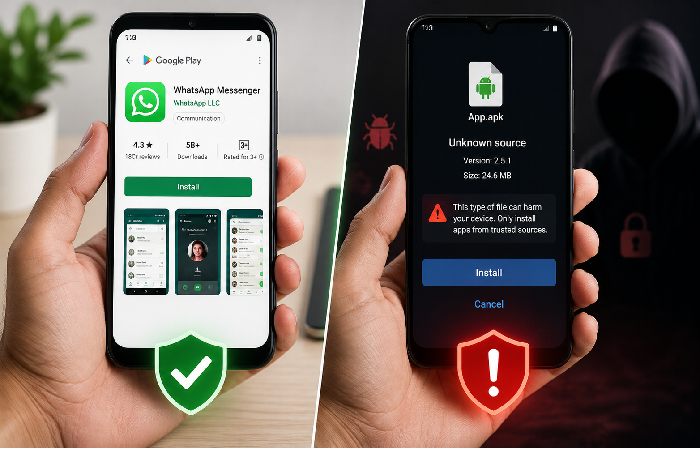
When you sideload an APK from any third-party source, you bypass Google Play Protect’s pre-install scanning. That’s the security layer designed to flag malware before installation.
Per Google’s Play Protect documentation, apps installed from outside the Play Store still get scanned — but the protection is weaker, and risk is higher.
An easy-to-make mistake is to assume that the tiny lock icon (represented by HTTPS) in your browser indicates the download itself is secure. It‘s not. HTTPS indicates only that the connection between your phone and the website is secure. It‘s to prevent other people on the network from spying on your activities. It tells you nothing about whether the APK file under that download button is safe, corrupted, or unsafe. Connection security and file security are two entirely different checks–Apkek.org only assures you of the first.
As for India, CERT-In has issued advisories related to malicious and pirated Android applications circulated on third-party sources, such as fake banking applications and earning applications.
The risks when downloading APKs through a site like apkek.org:
- Modified files: If there is no cryptographic proof, then there is really no way to know that the APK you got is the one the developer published. The advertiser can insert adware, spyware, or credential-stealing code into a “free” application.
- Obsolete or insecure versions. Third-party sites might mirror older builds no longer available on the Play Store. Such builds could contain missing security patches.
- Fake clones. Some APKs claim to be the famous ones (banking, social, earnings, etc) yet are made by another party completely. Without signatures or hashes, one can distinguish the original one.
- No safety backstop. Installing from Google Play puts Play Protect and Google‘s policies in place, giving you some kind of lead as to authority if an application is found to be malicious after the fact. With random APKs, there is no revoke path or automatic warning.
Trusted sites will include developer signatures and SHA256 hashes. Both signatures and hashes can be used to verify the sender, and they confirm the file wasn‘t altered while in transit. Apkek.org publishes neither, so you are blindly trusting.
Apkek.org does not publish any file hashes or signature info for any APK it links to. This means you can‘t know for sure if the file you are about to install is what the developer actually published.
7-Point Safety Checklist Before Downloading Any APK
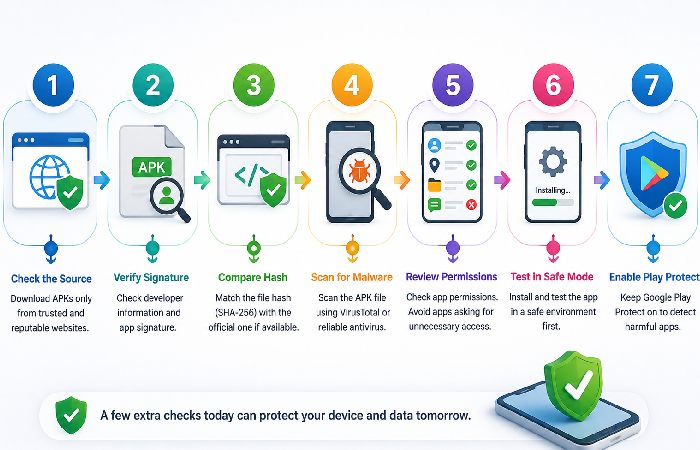
If you decide to install an APK from any third-party source — apkek.org or otherwise — run this checklist first. Every time.
- Check the source’s transparency. Real About page? Named team? Verified contact? If three answers are no, walk away.
- Confirm developer signature. Check using APK Analyser or something similar like Apktool to verify the signing certificate is the same as the developer.
- Compare the SHA256 hash. Think of hash like a file‘s fingerprint. If the hash you downloaded is not the same as the one the developer published (say, on the developer‘s site or on APKMirror), then the file was tampered with and should not be installed.
- Scan with VirusTotal. Upload to virustotal.com before you hit install. VirusTotal scours the file with dozens of antivirus engines and marks known malware. It’s free, takes less than a minute, and will reveal a number of high-profile threats often missed by even a single phone antivirus.
- Check requested permissions. A flashlight app asking for SMS access is a red flag. Review permissions against OWASP’s Mobile Top 10 risks.
- Install on a secondary device first. If the app behaves strangely, you haven’t compromised your primary phone.
- Keep Play Protect enabled. Settings → Security → Google Play Protect → toggle on. It scans sideloaded apps too.
In practice, many people skip steps 2 and 3 because they feel “too technical” — but those are often the checks most likely to catch a tampered or malicious file before it ever reaches your main device.
If you don’t have time for the full checklist every single time, at least run this quick 5‑step trust check on any site or app source:
- Try to find a genuine About/Company page that has a business name and contact information.
- Do a search for”[ site name ] review” and ”[ site name] scam” individually. And see whether any results are displayed.
- See if the app is also available on the Google Play Store or some other confirmed store.
- Be aware of the site if they demand large amount of payment or sensitive information before allowing you to perform any test.
- If it involves money, banking, or health, check it out with regulators or official sources before you do anything.
What to Do If You Already Installed a Risky APK
If you’ve already installed something from Apkek.org or any other third‑party APK site and you’re not sure it’s safe, treat it as a security incident:
- Uninstall the app immediately. Go to Settings → Apps → [App name] → Uninstall.
- Run a full device scan. Use Google Play Protect (built into Android) and, if you prefer, one reputable mobile antivirus app — not five different ones.
- Change critical passwords. Start with email, banking apps, UPI apps, and any service where a compromised account would hurt.
- Verify device admin access. Open Settings -gt; Security -gt; Device admin apps and uncheck the trusting anything you don‘t recognize. Some malicious apps attempt to become unremovable by requesting admin status.
- Monitor your accounts and SMS for suspicious activity like received login OTPs that you didn‘t request, new devices, or strange transactions.
- Report serious crimes. If you think you might be a victim of a financial scam or identity theft in India, call the National Cyber Crime Helpline at 1930 or visit cybercrime.gov.in to report a cybercrime.
Safer Alternatives for Indian Android Users
For 95% of what apkek.org claims to offer, there are safer, better-known options. Use Apkek.org, if at all, as a discovery layer — not as your primary download source.
APKMirror and F‑Droid, in particular, publish cryptographic information (signatures and hashes) so you can verify that the file you’re installing is the same one the developer released. Apkek.org doesn’t — which is the core reason it shouldn’t be your first choice for APKs, especially on a device you use for UPI and banking.
| Platform | Developer signature verification | SHA‑256 hash published | Malware scanning / Play Protect | Ownership transparency | Content focus | India‑friendly |
|---|---|---|---|---|---|---|
| Google Play Store | Yes – mandatory for all apps | N/A (handled inside Play system) | Play Protect scans apps before/after install | Google LLC | Full app marketplace | Yes |
| APKMirror | Yes – matches signatures against official Play release | Yes – for every file | Virus/malware checks per upload | Public (Android Police / Illogical Robot LLC) | APK files only | Yes |
| F‑Droid | Yes – all builds signed from audited source code | Yes – per build | Community and source‑based review | Public (open‑source project) | Open‑source Android apps only | Yes |
| Apkek.org | Not disclosed | No | Not disclosed | Hidden (WHOIS privacy, no About page) | Mixed blog: APK links, earning guides, random topics | Partial |
APKMirror and F‑Droid, in particular, publish cryptographic information (signatures and hashes) so you can verify that the file you’re installing is the same one the developer released. Apkek.org doesn’t — which is the core reason it shouldn’t be your first choice for APKs, especially on a device you use for UPI and banking.
APKMirror in particular publishes SHA-256 hashes for every file and verifies developer signatures. That’s the standard apkek.org doesn’t meet.
Who Should (and Shouldn’t) Use Apkek.org
Might be okay for:
- Casual readers browsing general tech/app content with no installation intent
- Users in Pakistan looking at telecom-specific guides (Jazz, Telenor, Zong)
- Anyone using it as one of several sources, not the primary one
Should avoid:
- Indian users hoping to earn from TikTok or Snack Video (banned)
- Anyone planning to install APKs without independent verification
- Users seeking serious freelance or earning guidance — go to Upwork, Fiverr, or Internshala directly
- Anyone uncomfortable with sites that hide ownership information
The safest way to think about Apkek.org is as a discovery layer, not a download source: you can note down interesting app names there, but you should search for and install them via the Play Store or a verified APK site instead.
How This Review Was Put Together
This article is compiled from the publicly available data on Apkek.org, including the visible content inside the site‘s pages, references on other review portals, and common Android security best practices. The section on Banning, Cybercrime reporting in India, and Safe APK installation refers to the documentation and government advisories available as of May 2026. As the information is subject to change, especially on the themes of Banning and security breaches, you should cross-verify the important points mentioned here through official sources before taking any decision on a serious note.
Final Verdict
Apkek.org isn’t a scam in the dramatic sense. It’s a low-transparency content blog with mixed-quality information, some real earning suggestions, some misleading ones, and APK references that lack basic safety signals.
For Indian users in 2026, the practical recommendation is this: read it as you’d read any anonymous blog — with skepticism. Don’t install anything based purely on its word. And for actual earnings, go to verified platforms directly instead of going through a multi-redirect blog.
The site should not have an‘avoid at all costs’ warning, either. Neither should the site be trusted – it‘s in breach of the trust put in it. After all, it concerns your money and your machine. Always verify essential facts, limits, payout rules, security procedures, etc. With the various authorities (regulators, UPI banks/other providers or app documentation), before acting upon an earning or installation tip off a third-party blog.
Frequently Asked Questions
Q: Is apkek.org safe to visit?
Mostly yes. Browsing the site itself doesn’t appear to drop malware, and it uses HTTPS. The risk isn’t the visit — it’s what you install based on what you read there.
Q: Is apkek.org legal in India?
A: The site is perfectly legal to access. Getting APKs is also generally legal, just don‘t use cracked paid applications or pirated software. The real issue is safety, not legality: an APK may be legal but break your data, or get your account banned, if it violates a platform‘s terms of service. Think of ‘legal’ and ‘safe’ as two separate issues and answer both questions before installing anything.
Q: Can I really earn money through apps listed on apkek.org?
A: Some of the apps mentioned — like Upwork or Fiverr — can absolutely lead to real earnings, but only with skill and consistent work. Many “no‑investment” earning apps and watch‑and‑earn platforms pay very small amounts, have high withdrawal thresholds, or aren’t even available in India anymore. Treat any guide promising “easy daily income” as marketing, not a guaranteed outcome, and always cross‑check with current user reviews and official documentation.
Q: Are the APKs on apkek.org safe?
No way to verify, as the site doesn‘t publish file hashes or any developer signatures. Always run with VirusTotal before installing, and preferably, better yet use APKMirror or the Play Store.
Q: Who owns apkek.org?
Unknown. The WHOIS record is privacy-protected, there’s no About page, and the site lists no founder or registered business. That opacity is itself a trust signal — a weak one.
Q: What’s a safer alternative to apkek.org for Indian users?
A: For most uses, the Google Play Store is the safest fallback – every app it has is inspected by Play Protect, and published under some reputable developer account. If you need an APK at that moment, though, APKMirror offers a secure alternative, as it verifies cryptographic signatures and shows hashes for each upload. FDroid is aimed at open-source software. None of those three charges anything; they are all more transparent and ethical than an anonymous blog with no mention of vetting processes.