

Your app works perfectly in the emulator. Then a real user — running a Samsung Galaxy A-series with Android 13 and a manufacturer skin — hits a layout bug you never saw coming. Or a payment screen hangs on an older iPhone SE with iOS 15. These aren’t edge cases. They’re the norm.
Device fragmentation is one of the most persistent challenges in mobile development. According to a 2025 guide on mobile device farms from Qyrus, Android holds the largest share of the global mobile OS market, with iOS in second place, but within those ecosystems the spread of screen sizes, OS versions, hardware tiers, RAM configurations, and OEM skins creates a testing surface that no single developer machine can cover.
This is where device farms come in. They give your QA and engineering teams remote access to hundreds of real devices — without buying, racking, or maintaining a single piece of hardware.
This guide covers what a device farm is, how it works, the different types, and how to choose the right one for your team. Whether you’re a QA engineer, mobile developer, or DevOps lead, you’ll leave with a clear framework — not just a vendor list.
Table of Contents
Quick Answers
- What is a device farm? → A centralized pool of real physical devices (or simulators) accessible remotely for app and web testing
- Why use one? → Emulators can’t replicate real-world hardware behavior, OEM skins, or network conditions
- Types? → Public cloud, private/on-premise, hybrid
- Best for? → QA teams, mobile developers, DevOps pipelines requiring CI/CD integration
- Top tools? → AWS Device Farm, BrowserStack, Firebase Test Lab, Sauce Labs, LambdaTest
What Is a Device Farm?
A device farm is a collection of real physical mobile devices — and sometimes simulators — hosted centrally and made available for remote testing. Developers and QA engineers connect to these devices over the internet to run manual or automated tests without owning the hardware.
A device farm is a testing infrastructure that provides access to multiple real physical devices, allowing teams to run app tests across different hardware and operating system environments. TestGrid Think of it as a shared testing lab in the cloud — stocked with iPhones, Android flagships, mid-range devices, and tablets — that your team accesses on demand.
Device farms are used to verify that an app functions correctly, performs well, and looks right across the fragmented landscape of devices your actual users carry.
Device Farm vs. Emulator vs. Simulator

| Emulator/Simulator | Device Farm (Real Devices) | |
|---|---|---|
| Hardware | Virtualized | Real physical hardware |
| OEM skins | No | Yes (Samsung One UI, etc.) |
| Real network behavior | No | Yes |
| Camera/sensor testing | Limited | Full |
| Performance accuracy | Low | High |
| Cost | Free/low | Paid (cloud) or upfront (in-house) |
Emulators and simulators are useful for rapid early-stage development. But for pre-release validation, regression testing, and performance testing, real devices catch classes of bugs that emulators simply cannot replicate. As noted in Google’s Firebase Test Lab documentation, real device testing surfaces issues tied to actual hardware behavior, graphics pipelines, and network stack behavior.
Device Farm vs. Device Cloud — Is There a Difference?
The terms are often used interchangeably. In practice:
- Device farm typically refers to the physical infrastructure (the rack of devices)
- Device cloud refers to the service layer — the platform that manages access, scheduling, and reporting
Most commercial offerings today combine both. When vendors say “device cloud,” they mean a device farm with a cloud access interface.
How Does a Device Farm Work?
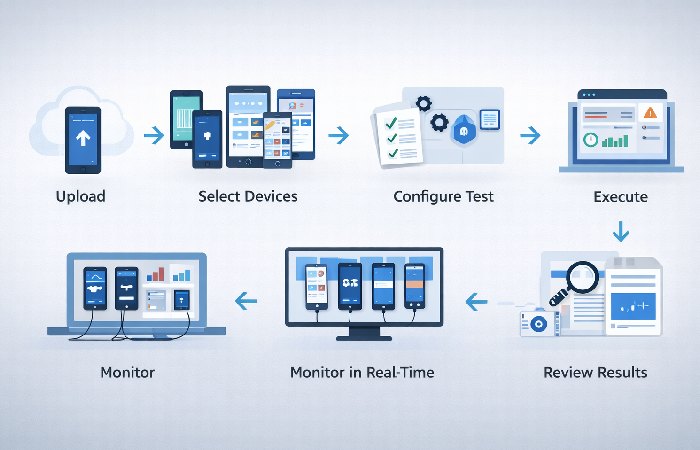
A device farm functions as a remote testing environment with a management layer on top. Here’s what happens when a tester or automated pipeline connects to one:
The Testing Workflow (Step-by-Step)
- Upload your app — The APK (Android) or IPA (iOS) file is uploaded to the device farm console
- Select devices — Choose specific models, OS versions, or run across a predefined device matrix
- Configure the test — Set test type: manual session, automated script (Appium, Espresso, XCUITest), or both
- Execute — Tests run simultaneously across all selected devices (parallel execution)
- Monitor in real time — Live view of each device screen, log streams, and performance metrics
- Review results — The farm generates a test report with screenshots, video recordings, crash logs, and performance data per device
- Debug — Use logs and screenshots to isolate device-specific failures
A device farm purposely maintains the hardware, software, and network configurations of the devices in a fixed state, offering a consistent and accurate testing environment that mimics what consumers would experience when using the program.
How Device Farms Integrate with CI/CD Pipelines
One of the most important use cases for modern teams is plugging a device farm directly into the CI/CD pipeline. When a developer pushes code, the pipeline can automatically:
- Trigger a test suite on a defined device matrix
- Run tests in parallel to reduce total execution time
- Block a build from deploying if device-specific failures are detected
- Post results directly to Slack, Jira, or GitHub pull requests
Common integration points include Jenkins, GitHub Actions, GitLab CI, and CircleCI. Most major device farm platforms offer official plugins or CLI tools for each. According to AWS Device Farm documentation, the service natively supports integration with popular CI/CD systems, enabling automated test runs on real devices as part of any deployment pipeline.
Types of Device Farms
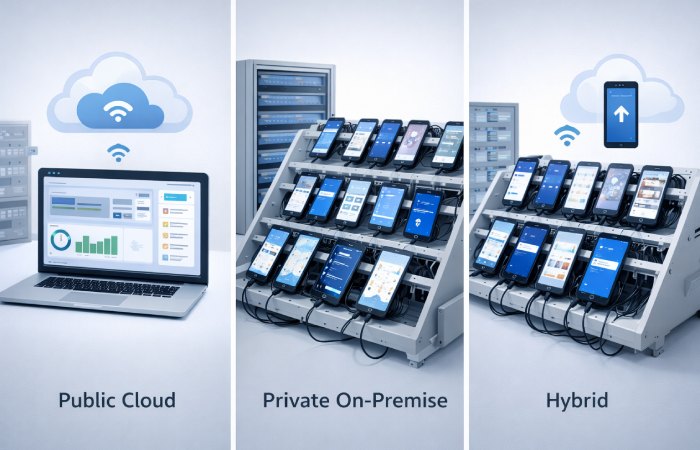
Understanding the three deployment models is essential before choosing a vendor or building your own.
| Type | Hosted By | Device Control | Cost Model | Best For |
|---|---|---|---|---|
| Public Cloud | Third-party vendor | Low (shared pool) | Subscription / pay-per-use | Startups, cross-platform teams |
| Private / On-Premise | Your organization | Full | Capital expense + maintenance | Enterprise, regulated industries |
| Hybrid | Mixed | Medium | Mixed | Large teams with diverse needs |
Public Cloud Device Farms
Public cloud farms are managed by vendors like BrowserStack, Sauce Labs, or AWS. Public cloud farms are services managed by third-party vendors that provide on-demand access to a large, shared pool of thousands of real mobile devices. This model requires no upfront hardware investment and eliminates maintenance overhead, as the vendor handles everything.
Pros: Instant access, no hardware management, always-current device inventory, easy scaling Cons: Shared infrastructure raises data privacy concerns; session limits on entry plans; recurring costs add up at enterprise scale
Private / On-Premise Device Farms
A private farm uses devices your organization owns, connected to a management platform for remote access. As 42Gears explains, this setup lets teams connect their own devices to the cloud for remote testing and maintain full control over device settings, OS versions, and testing schedules.
Pros: Full data control, ideal for banking/healthcare apps, no shared-resource contention, long-term cost efficiency Cons: Upfront hardware investment, device procurement/maintenance overhead, you manage OS updates
Hybrid Device Farms
Hybrid models combine an in-house private farm for sensitive, high-frequency test cases with cloud access for edge devices or geographic testing. This is increasingly the model large enterprises adopt — private for security-critical flows, cloud for coverage breadth.
Key Benefits of Using Device Farms
Parallel Testing at Scale
Testers can perform parallel testing with device farms, which enables several test cases to execute concurrently on various devices. A guide from Tricentis notes that this simultaneous execution shortens testing time significantly, speeds up feedback loops, and accelerates overall delivery.
Instead of running a 200-test suite sequentially on one device (which might take hours), a device farm can distribute those tests across 50 devices and complete the run in minutes.
Real-World Bug Detection
Hardware differences impact performance metrics significantly across devices. As highlighted in a device farm testing guide from Panto, testing on real devices reveals memory constraints, processing power limits, thermal behavior, and network variations (3G, 4G, 5G) that emulators cannot simulate accurately, exposing bugs that only appear under real-world conditions.
Cost Efficiency vs. In-House Labs
Cost savings are substantial compared to maintaining on-premise device labs. One flagship iPhone costs $1,200, while a device farm subscription starts at $15/month for unlimited access. At small scale, cloud farms are nearly always cheaper. At enterprise scale (hundreds of concurrent test runs), a private farm may offer better economics over a 2–3 year horizon.
For many teams, the build-vs-buy break-even point often starts to become worth modeling once usage reaches roughly 500+ concurrent device-hours per month, but the exact threshold depends on labor costs, device mix, and maintenance overhead. Below that threshold, cloud subscription models win on total cost of ownership.
By combining continuous testing with a cloud-based device farm, teams can simulate real-world user conditions across diverse devices while keeping performance testing both scalable and cost-effective.
Top Device Farm Tools Compared (2026)
| Tool | Best For | Real Devices | Free Tier | Starts At |
|---|---|---|---|---|
| AWS Device Farm | AWS-native teams | Yes | No | ~$0.17/device-minute |
| BrowserStack | Cross-platform, CI/CD integration | Yes | Trial | ~$29/month |
| Firebase Test Lab | Android-first / Google ecosystem | Yes | Yes (limits) | Free → paid tiers |
| Sauce Labs | Enterprise automation | Yes | Trial | Custom pricing |
| LambdaTest | Cost-conscious teams | Yes | Free plan | ~$15/month |
| HeadSpin | Global network testing | Yes | No | Custom pricing |
| Kobiton | AI-assisted testing | Yes | Trial | Custom pricing |
Note on free tiers: Firebase Test Lab’s free tier (5 physical device hours/day) is genuinely useful for early-stage Android testing. But session limits, queuing, and device availability become constraints quickly. Don’t plan a production QA workflow around a free tier.
How to Choose the Right Device Farm
Use this decision checklist before committing to a platform or architecture:
Step 1 — Define your device matrix
- How many unique device/OS combinations do you need to cover?
- Do you have data on what devices your actual users carry? (Check analytics first)
Step 2 — Assess your security requirements
- Does your app handle PII, payment data, or regulated health information?
- If yes → private or hybrid farm is likely required
Security and Compliance Considerations
If your app handles payments, healthcare data, or government workloads, do not treat a device farm like a generic SaaS tool. Look for providers that offer private or dedicated device pools, strong data isolation, and third‑party certifications such as SOC 2 and ISO 27001, along with GDPR support where relevant. For highly regulated environments, you may need a private cloud or on‑premise device farm to ensure that test data never leaves your own controlled infrastructure.
Step 3 — Evaluate your testing volume
- How many test runs per day? How many concurrent devices?
- <500 concurrent device-hours/month → public cloud wins
- >500 and growing → run a build-vs-buy cost model
Step 4 — Check CI/CD integration
- Does the platform have a plugin for your pipeline (Jenkins, GitHub Actions, etc.)?
- Does it support your test framework (Appium, Espresso, XCUITest, Detox)?
Step 5 — Geographic and network testing needs
- Do you need to test under specific regional network conditions (latency, carrier behavior)?
- Tools like HeadSpin offer real SIM-enabled devices in 50+ locations globally
Step 6 — Evaluate support and SLAs
- What’s the vendor’s uptime SLA?
- Is enterprise-grade support available?
Build vs. Buy — When an In-House Lab Makes Sense
Build your own private farm when:
- You run >50 concurrent test sessions regularly
- Your app handles sensitive regulated data
- You already own a substantial device inventory
- You have DevOps capacity to manage the infrastructure
Stick with a cloud vendor when:
- You’re testing on <20 device configurations
- Your team is small or distributed globally
- You need immediate access to the latest device models
- You don’t want to manage hardware procurement
Build vs. Buy — The Hidden Costs of a Self-Hosted Device Farm
Vendor pages rarely show this table. Practitioner communities and engineering teams surface these costs repeatedly when they try to build a lab in‑house instead of using a cloud device farm.
| Cost Category | Typical Impact | Notes |
|---|---|---|
| Device procurement | $200–$800 per device | Flagship models cost more; you usually need both iOS and Android coverage. |
| USB hub infrastructure | $50–$200 per hub | Consumer-grade hubs cause power and stability issues at scale; industrial hubs are more reliable. |
| Mac mini / build server | $800–$1,200 per unit | iOS automation (XCTest/XCUITest) requires macOS hardware for signing and running tests. |
| DevOps maintenance time | 4–8 hours per week per 100 devices | OS updates, connectivity issues, device replacement, flaky USB connections. |
| Device refresh cycle | Every 18–24 months | Older devices drop off your OS support matrix and must be replaced to match user traffic. |
| Physical space and power | Variable | Charging infrastructure, rack space, cooling, and secure storage all add up over time. |
Build vs. Buy Decision Matrix
Use this quick matrix to decide whether a cloud device farm, a hybrid setup, or a fully self‑hosted lab makes sense for your team.
| Team profile | Recommended approach |
|---|---|
| Startup or team with <10 engineers | Public cloud device farm — zero CapEx, instant coverage, scale up or down as needed. |
| Mid-size team (10–50 engineers) | Primarily public cloud, with a small set of physical devices for critical edge cases. |
| Enterprise team (50+ engineers) | Hybrid model: private or on‑premise for regulated or high‑sensitivity workloads, public cloud for broad coverage. |
| Regulated industry (fintech, healthcare, government) | Private cloud or on‑premise farm with strong security and compliance guarantees (SOC 2, ISO 27001, GDPR, etc.). |
| Very high test volume (hundreds of thousands of device‑minutes per month) | Model both options carefully; at very high, steady usage levels, a well‑run on‑premise lab can become cost‑competitive. |
Common Mistakes to Avoid
1. Testing only on flagship devices
Your users are not all on iPhone 15 Pros. Check your analytics — budget and mid-range Android devices are often your largest segment.
2. Skipping network condition testing
Testing on WiFi only misses a huge category of real-world bugs. Most device farms let you simulate 3G/4G/5G conditions — use that feature.
3. Treating parallel testing as a silver bullet
Teams identify critical bugs before public release rather than post-launch when reputation damage occurs. But parallel testing fails when test cases share state or depend on the same data fixtures. Ensure proper test isolation before scaling up device count.
4. Assuming cloud replaces all physical devices
Cloud device farms are excellent for breadth of coverage, but some hardware interactions are still best validated on physical devices you own. Keep a small set of 5–10 critical phones and tablets on‑site for flows like NFC payments, Bluetooth accessories, camera quality checks, and biometric sensors, and use the device farm to cover the broader device matrix.
5. Ignoring device farm maintenance (for private setups)
A private farm requires a device refresh cycle. Devices running OS versions that represent less than 2% of your user base should be cycled out. Budget for this upfront.
6. Over-relying on the free tier
Firebase Test Lab and Samsung Remote Test Lab are useful for initial validation. They are not substitutes for a structured testing infrastructure. Session queuing and device contention will slow your pipeline at scale.
Who This Is For (and Who Should Skip It)
Best suited for:
- QA engineers and SDETs managing mobile regression suites
- Mobile-first startups preparing for a major launch or scaling to new markets
- DevOps and platform engineering teams building automated release pipelines
- Enterprise teams in regulated industries evaluating private or hybrid options
Proceed with caution / may not need a full device farm:
- Solo developers or very early-stage startups with minimal device-specific bugs — a BrowserStack basic plan or Firebase free tier may suffice
- Teams whose analytics show 90%+ of users on 2–3 device configurations — a targeted device lab beats a sprawling farm
- Projects where emulator-level testing is sufficient (pure web apps with no native capabilities)
Frequently Asked Questions
Q: What is a device farm in mobile testing?
A: A device farm is a centralized pool of real physical mobile devices that QA engineers and developers access remotely to test apps across different hardware, OS versions, and configurations. It enables parallel testing at scale without requiring teams to own the physical devices.
Q: What’s the difference between a device farm and an emulator?
A: Emulators simulate device behavior on a desktop OS and are fast for early development. Device farms use real hardware, catching bugs tied to OEM software layers, actual GPU behavior, camera APIs, and real network conditions that emulators cannot replicate.
Q: How does AWS Device Farm work?
A: AWS Device Farm lets you upload your app and test scripts to AWS infrastructure, select from a library of real Android and iOS devices, and run automated or manual tests. Results include per-device logs, screenshots, and video recordings. It integrates natively with AWS CodePipeline and popular CI/CD tools.
Q: How much does a device farm cost?
A: Cloud device farms range from free (Firebase Test Lab with daily limits) to $15–$30/month for basic plans, up to custom enterprise pricing for unlimited concurrent sessions. AWS charges approximately $0.17 per device-minute. Building an in-house private farm requires upfront device investment but can be more economical at high testing volume (>500 concurrent device-hours/month).
Q: Is a device farm necessary for CI/CD?
A: Not strictly necessary, but highly recommended for mobile apps. Integrating a device farm into CI/CD allows automated tests to run on real devices with every code push, catching device-specific regressions before they reach production. Without it, mobile testing becomes a manual bottleneck in an otherwise automated pipeline.
Q: What is Android fragmentation and why does it matter for device farms?
A: Android fragmentation refers to the wide variety of Android versions, OEM customizations (like Samsung One UI or Xiaomi MIUI), screen sizes, and hardware configurations across thousands of device models. This creates unique behavior per device that emulators can’t simulate, making device farm testing essential for any Android app targeting a broad audience.
The Future of Device Farms: AI and Smarter Testing
Modern device farms are starting to ship AI‑driven features that reduce the maintenance burden of traditional scripted tests. Some platforms offer AI‑assisted exploratory runs that automatically navigate your app, while “self‑healing” locators adjust when UI elements move or are renamed, keeping tests stable across releases. Others use analytics and historical defects to recommend an optimal subset of devices instead of brute‑forcing every model, which can cut costs while still catching more bugs where they actually occur. You do not have to adopt every AI feature on day one, but it is worth choosing a provider that is actively investing in these capabilities so your testing strategy can evolve over time.
Final Verdict
Device farms solve a real, expensive problem: the impossibility of manually testing every device configuration your users bring to your app. For most mobile teams beyond the earliest prototype stage, some form of device farm infrastructure is not optional — it’s a quality prerequisite.
The practical recommendation:
- Start with a cloud-based device farm (Firebase Test Lab or BrowserStack) to validate the workflow
- Build a defined device matrix based on your actual user analytics — don’t test everything
- Integrate into CI/CD early; the ROI compounds as your release cadence increases
- Evaluate a private or hybrid model once you exceed ~500 concurrent testing hours per month or handle regulated data
Device farms are not magic. They require disciplined test architecture, proper isolation, and a realistic device matrix to deliver their full value. But when set up correctly, they are one of the highest-leverage investments a mobile engineering team can make.