

You probably saw it on Instagram first. Someone you follow posts a Story — “ask me something anonymous” — with a link. Maybe you tapped it. Maybe you saw a friend share one of those “Insta Nice” screenshots. Either way, you ended up wondering: what exactly is askingmod.in, and should you trust it?
It’s a fair question — and the answer is more complicated than the site’s simple interface suggests.
Askingmod.in in 2026 is effectively split between perception and reality. It’s widely described online as a helpful Q&A community where people share knowledge, but the current live version runs more like an app and mod download store. That gap between what people expect and what the site actually delivers is the core reason this review exists.
This guide covers what askingmod.in really is in 2026, what the independent trust scores say, what the apps on it actually do, and why at least one aspect of the site — a linked Telegram channel — should stop you cold before you download anything.
It’s written for Indian users who keep seeing askingmod.in or “AskingMode” links on Instagram, WhatsApp, and Telegram and want a clear, safety-first verdict before they click or install anything.
Table of Contents
How This Review Was Researched
To write this review, I visited askingmod.in directly and documented what the live site shows in 2026. I ran the domain through both Gridinsoft’s online scanner and ScamAdviser independently, examined each app listing on the site, and traced the linked Telegram channel to identify what it actually is. No apps from the platform were installed during this process. All security scores and site content referenced in this article were recorded on 30 April 2026.
A Note on This Review
Key Takeaways
- What is it? Askingmod.in was widely used and described as an Instagram‑linked anonymous Q&A tool. It now operates as a modded APK download platform called AS King Mods Store.
- Is it on Google Play Store? No. Not listed, not verified.
- Trust score? Independent security scanners give askingmod.in a very low trust score and flag it as high-risk.
- Are the apps safe? The platform lists fintech APKs (PhonePe, FamPay) from unofficial sources — a significant legal and security risk.
- Conclusion? The best bet for anyone is to not download anything from askingmod.in and instead use proven tools such as NGL(the anonymous Q&A app available on official app stores) or Instagram‘s native Q&A to seek questions.
Am I Already at Risk? — Quick Self-Check
Answer these five questions honestly:
- Have you tapped a link from an Instagram Story that took you to an external site to ask something anonymously?
- Have you downloaded any app from outside Google Play Store in the last six months?
- Have you entered your mobile number on a site promising free recharge or rewards?
- Have you granted accessibility access to any app you don’t fully recognize?
- Do you use PhonePe, GPay, or Paytm on the same device where you’ve installed unofficial apps?
Your result:
- 0 to 1 Yes — Low risk. Keep the habits you have.
- 2 to 3 Yes — Moderate risk. Read the “What to Do If You’ve Already Downloaded Something” section below.
- 4 to 5 Yes — Act now. Follow every step in that section and check your UPI transaction history immediately.
What Is Askingmod.in? (And What Has It Become in 2026?)
Askingmod.in — also written as “AskingMode.in” and currently branded as AS King Mods Store — is a third-party website that hosts modified Android application files (APKs). It is registered under a .in Indian domain and targets Android users primarily in India.
What “Modified” Actually Means
When someone modifies an app, they start with the original APK file, decompile its code, make whatever changes they want removing payment gates, unlockingIn-app features, or transplanting entirely new code recompile the file, and upload the file to the store. That file then is no longer vetted by Google, isn‘t being maintained by the original developer, and may have anything the modifier stuck into it in the first place tracking code, credtentials harvesters, or backdoors. It‘s a complete unknown to the user.
That’s what it is today. But it wasn’t always marketed that way.
The Original Q&A Concept vs. the Live Reality
Ask someone who first encountered askingmod.in through Instagram and they’ll describe it as an anonymous Q&A platform — similar to NGL or Instagram’s own “ask me anything” sticker. That’s how most older articles still frame it. But open the live site in 2026 and you’ll find something completely different: an app download store, not a Q&A community.
This gap matters more than it might seem. In cybersecurity, this pattern is called domain repurposing — a domain that once did one thing is quietly reused for something else entirely, while still carrying the old trust signals from its previous identity. Users think they’re landing on a familiar platform. The actual risk profile has changed completely. That silent pivot is itself a significant red flag, and it’s the reason this review exists.
How the site changed over time — verified via web archive
You can verify this identity shift yourself. The Internet Archive’s Wayback Machine stores historical snapshots of websites, and archived versions of askingmod.in show the progression from Q&A platform to APK store.
| Period | What the Site Showed |
|---|---|
| Pre-2024 | Earlier snapshots show an anonymous Q&A‑style interface linked to Instagram. |
| 2024-2025 | Later snapshots between 2024 and 2025 start showing APK listings mixed in with other content. |
| 2026 (current) | By 2026, archived copies show a full APK store under “AS King Mods Store” branding. |
AS King Mods Store — What the Site Actually Shows You
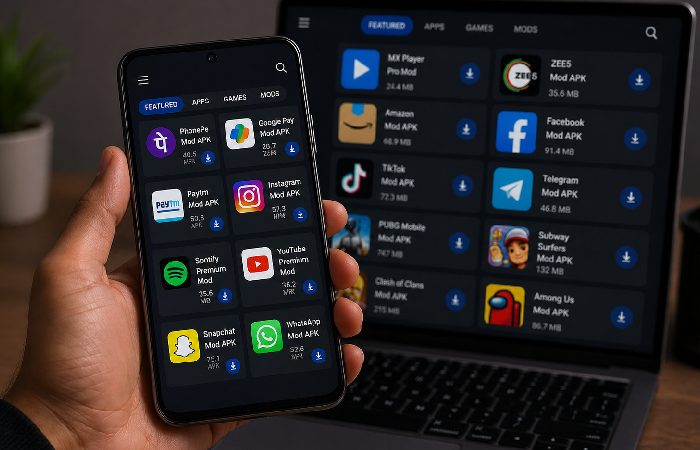
The live version of askingmod.in displays a grid of app listings under the branding “AS King Mods Store — Download premium modified apps and games with enhanced features, unlimited access, and no restrictions.”
Featured apps include: Insta Nice, Free Mobile Recharge, Funsta, Data Sell, FamPay Apk, and PhonePe Apk.
None of these are official versions from verified developers. None are listed on Google Play Store. And several of them — specifically the fintech APKs — raise serious concerns that go well beyond a simple “use with caution” warning.
But convenience isn’t the same as safety. And this is where the gap between the site’s pitch and the actual risk becomes important.
How Askingmod.in Actually Works — Three User Paths
Most people don’t type “askingmod.in” into a browser from scratch. They arrive there through one of three common paths — and each path has a different risk level.
1. Instagram “ask me anything” link
You see a Story or post that says “ask me something anonymously” with a link. You tap it, a page loads, and it lets you type and submit a question with no login or signup. That frictionless experience feels harmless, but even a simple web form can collect your IP, device details, and referral source, and can later redirect you into other flows without much warning.
2. APK download / “mod app” path
You search for a specific mod, or tap through from a blog/short, and land directly on an app card with a big “Download APK” button. The usual flow is “Download-> enable unknown source-> install-> open”. The actual danger is right after installation, when the APK will have access to very powerful permissions (SMS, accessibility, notification access) and run in background and not be checked by Play Store auto-update safety net.
Here’s what that actually looks like once it’s on your device:
- Step 1: You install the APK and open it. It looks normal.
- Step 2: It asks for accessibility access. You tap “Allow” without reading.
- Step 3: The app now runs in the background, even when you close it.
- Step 4: You open your banking app. The accessibility service records your keystrokes.
- Step 5: Your UPI PIN or password is now visible to the app’s backend server.
- Step 6: You receive a fraudulent transaction notification days later — sometimes weeks.
3. “Free recharge / earn” flow
You see a promise of “free recharge,” “earn money,” or “rewards” tied to an app like Free Mobile Recharge or Data Sell. The pattern is usually: enter phone number → receive OTP → enter OTP on the site or inside an app → then get funneled into extra tasks, redirects, or “verification” steps. Any flow that asks for OTP or UPI-related approvals in exchange for rewards should be treated as a high-risk funnel rather than a genuine offer, especially when it’s running through an unverified APK or web page.
Technical Safety Check — What the Evidence Says
Here’s where most review articles stop at “use with caution” without explaining what that actually means. Let’s go further and look at what independent tools and the live site actually show.
Gridinsoft Trust Score: 21/100
Gridinsoft’s online scanner assigns askingmod.in a trust score of 21/100 and classifies it as a potentially suspicious website, recommending that users avoid logging in, paying, or downloading anything unless they can independently verify the operator. Gridinsoft notes that low scores are based on a combination of factors such as domain age, hosting reputation, SSL status and blacklist checks; a score this low is a strong caution signal, even though the exact weighting of each factor isn’t public.
21 out of 100. That’s not a borderline result.
ScamAdviser Low Rating — What It Means
Askingmod.in goes on to pick up a very poor trust ranking on ScamAdviser, where it recommends “be careful when using this website”. This isn‘t proof of being a scam but is just another sign from the independent source that it should not be trusted.
Two independent automated security platforms, both flagging the same domain. Neither is perfect — they use algorithmic scoring, not manual investigations. But when two separate tools arrive at the same conclusion independently, that’s a pattern worth taking seriously.
For context, here’s how askingmod.in compares to trusted sites on the same tools:
| Site | Gridinsoft Score | ScamAdviser Rating | Play Store Listed |
|---|---|---|---|
| askingmod.in | 21/100 | High risk | No |
| ngl.link | Run scan to verify | Run scan to verify | Yes |
| instagram.com | Run scan to verify | Run scan to verify | Yes |
| cybercrime.gov.in | Run scan to verify | Run scan to verify | N/A |
Run your own check at gridinsoft.com/online-virus-scanner. Scores recorded April 2026.
WHOIS Analysis — Who Owns This Site?
The askingmod.in public WHOIS data is shielded by a privacy service. Therefore no owner name or organization name can be identified. While many trusted sites use privacy protection services to avoid spam, it seems suspect while associated with low trust scores and bad app listings.
Anonymous ownership isn’t automatically proof of malicious intent. Plenty of legitimate sites use WHOIS privacy. But combined with a 21/100 Gridinsoft score, a ScamAdviser warning, and the content concerns below — it adds another layer to an already concerning picture.
Is Askingmod.in on Google Play Store?
No. Not listed. Not verified by Google Play Protect.
Others also google “askingmod.in Play Store” but the site isn‘t listed anywhere with no link to any authentic Google Play pages or real app collections. Distributing modified apps usually breaks the service terms (even though it may not be technically illegal everywhere).
When you install any APK from outside the Play Store, Android displays a warning. Some APK distribution sites actively tell users to dismiss this warning. That’s not guidance you should follow — Google Play Protect exists specifically to flag apps that haven’t passed safety review.
The Telegram Red Flag Nobody Is Talking About
- This is the part no competing article mentions. Not one.
- The askingmod.in website includes a link to a Telegram channel: t.me/bdg_win_vip_offcial
- That channel is not a customer support channel. It’s not a community Q&A group. It is a Telegram channel that posts betting‑style content and gambling promotions.
- Why does an app download store link to a gambling Telegram channel? That’s a question worth sitting with.
How the APK and Telegram Pipeline Actually Works
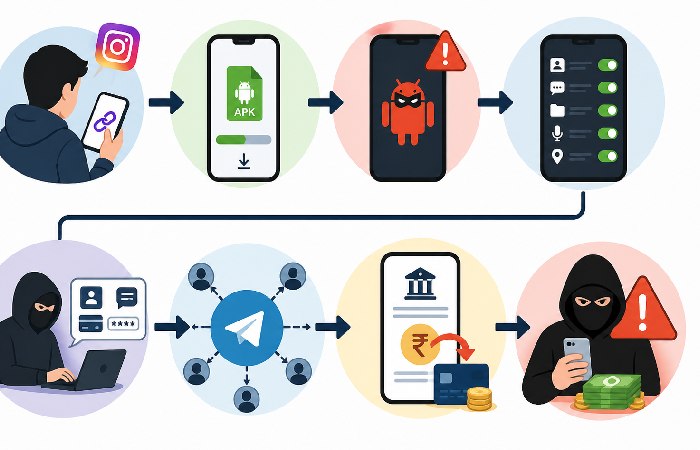
This isn’t a coincidence or a random link. Here’s the typical operational pattern:
An APK site drives traffic to a Telegram channel. The funnel follows a pattern similar to what Indian cybercrime authorities describe as task‑based investment scams — users complete small paid tasks to build false trust, then get invited into “premium” investment or betting groups. The APK acts as the distribution vehicle: once installed on your device, it can push notifications directly to you, bypassing spam filters entirely. The Telegram channel provides the monetisation mechanism for the operation.
The two pieces — APK store and Telegram gambling channel — aren’t random. They’re complementary parts of the same system. The store gets the app onto your phone. The channel tells you what to do with it.
This kind of cross-linking between an APK distribution site and a gambling or “earn money” channel matches patterns highlighted in advisories from India’s cybercrime authorities, including warnings from the Ministry of Home Affairs and the National Cyber Crime Reporting Portal about task‑based and investment scams that use social platforms and unofficial apps as funnels. These fraudsters using such operations often tell the victims to download particular apps during the process, the unofficial APK stores would be a natural delivery channel for this style of fraud. When installed, criminals could potentially have accès to all your phone activity (viewing your OTP, banking passwords, etc. through accessibility access or screen recording privileges).
The Telegram connection doesn’t definitively prove criminal intent. But it does tell you something about the ecosystem this platform operates within. Any platform genuinely focused on safe app distribution would have no reason to route users toward a gambling channel.
This Telegram connection is one of the most important risk signals in this review, and it is almost completely ignored by other ranking articles.
How to Spot a Fake APK Site — Applies to Any Platform, Not Just This One
Use this every time you land on an unfamiliar app download site:
A legitimate APK site will have:
- Named ownership with a verifiable company or individual behind it
- A clearly written privacy policy with contact details that resolve to a real entity
- Apps that are also listed on Google Play Store or Apple App Store
- A relatively high trust score (for example, above 70) on tools like Gridinsoft or ScamAdviser, understanding that no single score can prove a site is legitimate
- No links to gambling channels, unrelated Telegram groups, or “earn money” flows
A suspicious APK site will have:
- Hidden WHOIS ownership
- Apps not available on any official store
- Trust scores under 50 on independent scanners
- “Free recharge,” “earn money,” or “cashback” claims
- Telegram links unrelated to genuine customer support
If a site you’re looking at ticks two or more items from the suspicious column, close the tab.
App-by-App Breakdown — What You’re Actually Downloading
Let’s look at each app listed on askingmod.in specifically. Not the marketing pitch — the actual concerns.
Insta Nice — What It Claims vs. What It Does
“Insta Nice” is presented as a modified Instagram-adjacent tool. The name implies aesthetic enhancement — something that makes your Instagram experience better.
But modified social media apps are a significant risk category. Any unofficial version of an Instagram-linked app may:
- Request access to your Instagram credentials
- Intercept direct messages or stories
- Collect device identifiers without disclosure
Official Instagram App from Meta, the developer, is available for free on Play Store(google‘s official store for Android apps). In no way you should download alternate app from third party APK stores.
Free Mobile Recharge — The OTP Harvesting Risk
“Free recharge” is one of the most consistently effective lures in India’s online scam ecosystem.Urgent messages or those offering false reasources are clear flags. A genuine organisation will never request you to give your passwords, OTPs or payment approval over calls or messaging services.
Here’s how “free recharge” OTP harvesting typically works:
- User registers with their mobile number to “claim” the recharge
- An OTP is sent to their number — ostensibly for verification
- The platform collects the OTP, the device ID, and the mobile number
- This data can be used for SIM swap fraud or sold to third parties
No mobile operator in India — Jio, Airtel, Vi, or BSNL — partners with unofficial APK stores to deliver free recharge. That offer doesn’t exist. What exists is a data collection mechanism wearing a recharge-shaped costume.
Data Sell — Should an App Be Named “Data Sell”?
This one doesn’t require much analysis. An app literally called “Data Sell” on a platform that already has a low trust score is — at minimum — a transparency problem. At worst, it’s exactly what the name suggests.
No verified information exists about what this app actually does. That absence of transparency is itself a red flag.
FamPay APK & PhonePe APK — Why This Is a Legal Risk
This is the most serious concern on the entire site, because it moves the risk from “just another shady APK store” into territory that may have legal and financial consequences for Indian users.
FamPay and PhonePe are regulated fintech platforms operating under Reserve Bank of India (RBI) guidelines. Their official apps are available on Google Play Store and Apple App Store and are updated by their official development teams.
But the issue goes beyond ethics. Distributing unofficial modified versions of regulated fintech applications in India may violate:
- Indian IT Act 43 (section 43 unauthorized access, downloading, or copying of computer material)
- 66 section of Indian IT act relating to computer offences of electronic data theft or hacking
- The Apps like FamPay and Phone Pea including their Terms of service that specifically mentions reverse engineering or redistribution of the software.
If you download and use a modified version of PhonePe or FamPay from an unofficial source, you’re using software that hasn’t been security-audited by the original developer. Any transaction you make through that modified app could potentially expose your UPI credentials.
Advisories issued by the Reserve Bank of India and the Indian Cyber Crime Coordination Centre indicate that a majority of reported cybercrime cases involve UPI-related fraud and other digital payment scams in terms of both volume and value, most of which are associated with phishing links, fake QR codes, remote-access apps or SIM swap scams.
An unofficial fintech APK fits squarely into that risk category.
Protect Your UPI Right Now — Settings to Check Today
If you use UPI regularly, these steps reduce your exposure regardless of what apps you’ve previously installed:
- Set a daily transaction limit: Both PhonePe and Google Pay let you cap daily spending. Go to Settings > Payment Limits inside your UPI app.
- Enable SMS transaction alerts: This ensures you see every transaction even if your app is behaving abnormally. Contact your bank directly to activate if it isn’t already on.
- Review your linked accounts: Open your UPI app > Linked Bank Accounts. Remove any account you don’t recognize or actively use.
- Check app permissions monthly: Go to Settings > Apps > [your UPI app] > Permissions. A legitimate UPI app needs camera (for QR scanning), storage, and notifications. If it’s asking for accessibility access or SMS read access, that’s a red flag.
- Never store your UPI PIN in notes, screenshots, or message threads.
None of these take more than five minutes. Do them now if you haven’t already.
What These Apps Actually Request — Permission Breakdown
| App | These types of apps commonly request | What It Actually Needs | Why It’s a Risk |
|---|---|---|---|
| Insta Nice | Often requests Instagram login, camera, storage | None — it’s unofficial | Credential theft |
| Free Mobile Recharge | Often requests SMS read, contacts, phone ID | None — it’s a lure | OTP harvesting |
| FamPay APK | Often requests accessibility, SMS, notifications | N/A — use official app | UPI credential exposure |
Is Askingmod.in Legal in India?
Straight answer: simply visiting the site in your browser is unlikely, by itself, to break any law, but downloading and using modified apps from it — especially modified fintech apps — is a different and much riskier matter.
Indian IT Act — Key Sections
Section 43 covers unauthorized downloading of computer programs. Any modified APK which uses code taken from a licensed application without authorisation from the original developer, may push the distributor and perhaps the technically-aware user trying to install it into uncharted legal waters.
The scope of computer offences under section 66 is a little more broad, such as stealing data or masquerading access to a computer system. Any code in a hacked APK that was attempting to grab details of your credentials or device would be put any website hosting that APK (and latterly any thousands of users).
The legal framework is clear in what it covers, even if enforcement against individual APK downloaders has been inconsistent in practice. What matters for a typical user is this: if a modified PhonePe or FamPay APK contains code that harvests your credentials or enables unauthorized access to your account, the act of downloading and using that app puts you inside the scope of these provisions — regardless of whether you intended harm. The risk isn’t theoretical. It’s structural.
Indian government and its cyber agencies take measures to improve systems in fighting online frauds. The faster the frauds get reported the higher the likelihood of recovery and also the easier to trace and lock down criminal gangs.
What to Do If You’ve Already Downloaded Something
If you’ve already installed an app from askingmod.in:
- Remove the app immediately
- Reset any passwords for apps you use on the device you‘re using.
- Perform a security scan with an established anti virus application. For Indian android users, the two good free options are Malwarebytes for Android and Google Play Protect which is built into most android phones. (Settings > Security > Google Play Protect > “Scan”). Always only download an anti virus app from the Google play store and not any third party app store as fake security apps are themselves a popular scheme.
- Verify your bank statements and UPI transaction history for 30 days.
- If you see anything suspicious, make a complaint to India‘s National Cyber Crime Reporting Portal (NPCR Portal) at cybercrime.gov.in or call the 1930 cybercrime helpline immediatey.
How to Report Askingmod.in — And Why You Should
Most users don’t realise they can actively report suspicious sites. Doing so helps protect other Indian users who might encounter the same platform.
Here’s where to report it:
- Google Safe Browsing Submit the URL straight away in here. This reports the site to Google and may also get a report of “this is a dangerous site” to other visitors.
- CERT-In — File an incident report with India’s national cybersecurity agency. They track these reports to identify patterns across platforms.
- National Cybercrime Reporting Portal — Report at cybercrime.gov.in or call 1930. If you’ve experienced any financial loss, file here first and do it immediately.
Reporting takes under five minutes and contributes directly to the data that authorities use to act against fraudulent platforms.
Is Askingmod.in Safe? — The Definitive Verdict
For typical users, no — it is not safe to download apps from this platform. Here’s the risk matrix:
| Risk Category | Level | Reason |
|---|---|---|
| Data Risk | 🔴 High | Anonymous ownership, OTP harvesting via “free recharge,” “Data Sell” app |
| Device Risk | 🔴 High | No Play Store verification, no Google Play Protect review on APKs |
| Financial Risk | 🔴 High | Unofficial fintech APKs (PhonePe, FamPay) could expose UPI credentials |
| Legal Risk | 🟠 Medium-High | IT Act Sections 43 & 66 — redistribution of modified fintech apps |
| Privacy Risk | 🔴 High | WHOIS anonymity, Telegram gambling channel link, no transparent data policy |
For a typical user, the level of caution required to use this site safely is unrealistically high. In practice, the safest choice is to avoid downloading anything from askingmod.in and to stick to verified app stores instead.
For Indian users specifically — where UPI fraud is rising and cybercrime complaints on the National Cybercrime Reporting Portal crossed 22 lakh in 2024, with year‑on‑year growth of around 40% according to data from the Indian Cyber Crime Coordination Centre (I4C), Ministry of Home Affairs — the cost of that “convenience” is disproportionately high.
Safe Alternatives — What to Use Instead
If you found askingmod.in through Instagram’s anonymous Q&A trend, you don’t have to give up the format — you just need to use tools that have real app store listings and clear policies.
| Feature / Aspect | Askingmod.in | NGL | Tellonym | Instagram Questions Sticker |
|---|---|---|---|---|
| Core use case | Modded APKs, “Insta Nice”, free recharge, unofficial tools | Anonymous questions for Instagram/Snapchat friends | Ongoing anonymous Q&A profiles across platforms | Native Q&A in Stories |
| Anonymous questions | Originally yes; now unclear (APK-focused site) | Yes, sender is anonymous to others | Yes, sender is anonymous by default | No — creator can see who asked |
| Where you get it | Direct website + APK sideload from unknown sources | Available on official app stores | Available on official app stores | Built into Instagram app |
| Developer transparency | Hidden ownership (WHOIS privacy, no verified entity) | Operated by NGL Labs with public presence | Operated by a registered company with public listings | Owned by Meta Platforms |
| Privacy / data policy | Vague or not clearly disclosed | Published privacy policy | Published privacy policy and community guidelines | Covered under Meta’s official privacy policy |
| Content moderation | No visible moderation tools | Automated filters and safety systems | Reporting tools and moderation features | Uses Instagram’s built-in moderation system |
| Extra risk factors | Unverified APKs, modified fintech tools, Telegram links | Standard app store risks only | Standard app store risks only | No third-party risks or external downloads |
The simplest recommendation: Use Instagram’s native Q&A sticker. It’s built into the Stories feature, requires no third-party app, and operates under Meta’s existing privacy framework. You’re already on Instagram — there’s no reason to leave it for a third-party platform with a 21/100 trust score.
How to Protect Yourself — The “VERIFY BEFORE YOU TAP” Checklist
Utilize this on any new service you‘re introduced to via Instagram or WhatsApp or Telegram before you download:
- Evaluate the trust score Run the URL through gridinsoft.com/online-virus-scanner or scamadviser.com. Anything below 40 should be taken very seriously.
- Search for it on the Google Play Store — If it isn‘t available there, it hasn‘t made it through the Google review, which is an important indicator.
- Use WHOIS a hidden domain means can‘t confirm who you‘re working with.
- Look at external links — Where does the site point users outside its own pages? If it links to gambling channels, unrelated commercial operations, or obscure Telegram groups, stop there.
- Scan the APK before installing — If you still choose to proceed, upload the APK file to VirusTotal before installation. Free, takes under 60 seconds.
- Never enter OTP for a “reward” — Legitimate organizations never ask for passwords, OTPs, or payment approvals to receive something. If a platform asks for your OTP to claim free recharge or unlock features, that’s data harvesting — not a reward.
Who Should Avoid Askingmod.in Entirely
Avoid completely if you:
- Use UPI for regular payments (PhonePe, Paytm, Google Pay, etc.) — modified fintech APKs on this platform pose direct credential risks
- Are under 18 — the Telegram gambling channel link makes this inappropriate for minors
- Have limited technical knowledge — the risks here require verification steps most casual users won’t take
- Store sensitive personal or professional data on your phone
- Have previously been targeted by online fraud in India
And if you’re thinking “I’ll just browse without downloading” — that still carries risk. IP logging, behavioral tracking, and redirect scripts can operate without any action on your part, especially if you’re logged into other accounts on the same device.
Common Mistakes When Using Anonymous Q&A or Mod APK Sites
Even when people are aware that something “may be risky,” they are repeatedly caught in the same avoidable mistakes:
- Treating a clean, modern design as proof of safety. Visual polish is cheap; security and compliance are not.
- Installing an APK just because “everyone in my circle is using it.” Herd behaviour is exactly what scammers rely on to scale infections and fraud.
- Granting sensitive permissions too quickly — especially accessibility, SMS read access, notification access, or device admin rights — without asking why an app really needs them.
- Chasing “free recharge,” “earn money,” or “cashback” offers that require OTP, UPI PIN, card details, or “small verification payments.”
- Assuming a Telegram channel equals official customer support. Many scam and grey-market operations use Telegram as a distribution and pressure channel, not as a transparent support desk.
- Assuming “anonymous” is safe. Even if a message is anonymous for the senders, it might still be anonymous for our system and contents may still be collected in the background.
Final Verdict
Askingmod.in started out as a simple, viral anonymous Q&A link tied to Instagram Stories, but that version has effectively disappeared. Currently, it is an unproven APK repo user-operated, with a handful of security-scanner red flags, rebranded fintech applicationads, and a link to a betting-centric Telegram channel.
Collectively, that evidence does not advocate for the platform to be regarded as safe; rather calling it a high-risk place that would be imprudent for the general user to venture into.
For anonymous Q&A, stick to NGL, Tellonym or the built-in Questions sticker in Instagram free, verified to be available in the official app stores, and governed by transparent privacy and moderation rules. If you have done any askingmod.in interactions already, or disclosed sensitive data or financial info, make a formal complaint on India‘s National Cyber Crime Reporting Portal or call its cybercrime helpline at 1930 right away.
Frequently Asked Questions
Q: Is askingmod.in safe to use in 2026?
A: Not for downloading apps. Through comprehensive security analysis using Gridinsoft and ScamAdviser, askingmod.in has been identified as a potentially suspicious website, with multiple risk indicators found. Browsing the site without downloading carries lower risk, but the Telegram gambling channel link and anonymous ownership are concerns regardless of download activity.
Q: Is askingmod.in available on Google Play Store?
A: Generally, these are copyright violations and are even illegal in some countries, even if not in all. The pages on askingmod.in don‘t have a listing on the Play Store so none of the apps on them have been through the Safety check.
Q: Does askingmod.in really give free mobile recharge?
A: No verified instance of this working has been documented. The “free recharge” feature follows a pattern consistent with OTP harvesting — where your mobile number and verification code are collected under the guise of processing a reward. Legitimate organizations never ask for OTPs or payment approvals to deliver something of value. Treat any “free recharge” offer on a third-party APK site as a data collection attempt until proven otherwise.
Q: What is Insta Nice on askingmod.in?
A: Insta Nice is presented as a modified Instagram-adjacent app. But any unofficial modification of Instagram or Instagram-related apps carries serious risks — potential credential interception, unauthorized data access, and violation of Meta’s terms of service. The official Instagram app is free on Google Play Store. There’s no practical reason to use an unofficial version.
Q: Is downloading from askingmod.in legal in India?
A: Browsing the site is generally not illegal by itself. But downloading modified versions of apps — particularly regulated fintech apps like PhonePe or FamPay — may fall under Sections 43 and 66 of the Indian IT Act, which cover unauthorized access/copying of computer material and other computer-related offenses. Legal risk is significant. Important for financial apps. This is not legal advice always ask a lawyer if you have specific legal concerns.
Q: Who owns askingmod.in?
A: Unknown. The site owner uses a WHOIS privacy service to hide their identity, making it difficult to identify who actually runs the website — which contributes to its lower trust score on automated assessment tools.
Q: What is the Telegram channel linked from askingmod.in?
A: The site links to a Telegram channel called bdg_win_vip_offcial. It posts betting‑style content and gambling promotions — not customer support or a user community. No legitimate app distribution platform needs to route users into a gambling channel, and in this context the link is one of the clearest red flags on the entire site.
Q: How do I report askingmod.in to Indian authorities?
A: If you have been subjected to fraud, data theft, financial loss suffered on this platform please report to India National Cyber Crime Reporting Portal [NCPR] at cybercrime.gov.in or call to cybercrime helpline at 1930. If you lose money, every second counts. The chances that the bank freezes the money before the customer withdraws it are greater if the fraud has been reported to the bank within 120 minutes.