

You have a USPS receipt and you turn it over, and at the bottom there is a URL that tells you to visit the site and take the survey. First thing you thought of? “Nope this can‘t be real.
Fair question. The URL — postalexperience.com/pos — is the official United States Postal Service customer feedback survey. This survey is run by a company called InMoment on behalf of the USPS and it takes about 5–10 minutes. You don‘t need to register, you don‘t need to install any software and you won‘t have to give any credit card details.
This user guide (by marketingsguide.com not USPS) explains step by step how the survey works, what information is required from your receipt, how to distinguish a genuine survey invitation from a scam, what is actually done with your answers, and the reality of those ”$10,000 sweepstakes” advertisements you may see elsewhere.
Most of what you’ll read here comes from reviewing official USPS resources, public customer survey information, and how the live survey behaves today, rather than guessing based on outdated blog posts.
Table of Contents
Quick Answers
- What is it? → The official USPS Customer Experience Survey, hosted at postalexperience.com/pos
- Is it safe? → Yes — it’s operated by InMoment (a legitimate survey technology company) under contract with USPS
- What do you need? → A recent USPS retail receipt with your post office ZIP code and visit date
- How long does it take? → About 5–10 minutes
- Do you get a reward? → Possibly a sweepstakes entry, but reward details vary — check the official site for current terms before assuming anything
- Just want the steps? → Skip ahead to the “How to Complete the USPS Survey at PostalExperience.com/Pos” section below
What Is PostalExperience.com/Pos?
The brief version is. The site PostalExperience.com/pos is the URL for the USPS Customer Experience Questionnaire a customer survey USPS take to hear feedback from customers that visited the post office retail counter!
The survey questions include: overall satisfaction, whether staff was helpful, how long you waited in line, and whether you would recommend that post office location to a friend. USPS uses this data — aggregated across thousands of responses — to identify service issues at specific branches and track customer satisfaction trends over time.
And there’s an important detail most guides skip entirely. “POS” in the URL stands for Point of Sale. This specific survey targets retail counter transactions only. USPS actually runs several different feedback programs — including C360 surveys for delivery experiences, Business Service Network (BSN) surveys for commercial mailers, and Customer Care Center surveys for phone support interactions. The one at postalexperience.com/pos is specifically about your in-person visit.
USPS has publicly stated that it uses multiple survey programs and measurement tools to track satisfaction across retail, delivery, and contact center touchpoints, not just this single website. The POS survey is one piece of a larger customer‑experience system USPS uses to spot recurring issues and improve performance at individual locations.
So if you got a survey invitation after a package delivery (not a post office visit), you might be looking at a different USPS survey entirely.
Is the PostalExperience Survey Legitimate?
Short answer: yes. But the concern is understandable — and it’s actually one of the smartest questions you can ask before entering personal information on any website.
Legitimacy Snapshot: Real vs. Fake Signals
| Checkpoint | What you should see on a real survey |
|---|---|
| Web address in browser bar | Starts at https://www.postalexperience.com/pos and then redirects under InMoment |
| Branding on first screen | “U.S. Postal Service Customer Experience Questionnaire” with USPS branding |
| Data requested | Visit details and feedback about service, not payment or Social Security numbers |
| Timing of invitation | Email or prompt shortly after an actual USPS retail visit |
| Help / support references | Mentions of postalexperience@inmoment.com or USPS customer care contact details |
Who Actually Runs the Survey?
USPS doesn’t build or host this survey themselves. They contract it out to a company called InMoment, a customer experience management platform. That’s why, after you start the survey, you’ll typically see the address bar redirect under an InMoment‑managed domain associated with USPS, rather than staying only on postalexperience.com.
Older references online sometimes mention a company called Press Ganey as the survey vendor. That was the previous contractor. In recent years, InMoment has handled the USPS customer experience surveys, which is why some legacy support emails reference pressganey.com while more current ones use inmoment.com domains.
If you’ve received a survey invitation email from an @inmoment.com address — that’s legitimate. It’s not spam.
What Happens With Your Responses?
USPS and its survey vendor use your answers in aggregate form to evaluate overall customer experience trends, not to judge any single customer. Individual survey responses help identify service issues and improvement areas but are not used to manage your personal USPS account or billing.
How to Tell Official Surveys From Scams
Not every “USPS survey” link floating around the internet is real. Here’s a quick 5-point check you can run before entering anything:
- The URL is exactly postalexperience.com/pos — anything with extra words, hyphens, or different extensions (.me, .shop, .info) is a third-party site, not the official survey
- You’re never asked for payment details — the real survey doesn’t ask for credit card numbers, bank information, or Social Security numbers. Period.
- You recently visited a post office — the survey is tied to an actual retail transaction; if you haven’t been to a USPS location recently, a random survey invitation is suspicious
- The email sender domain is @inmoment.com or @usps.com — anything else is worth questioning
- The survey asks about your post office experience — questions about shipping packages, wait times, and clerk interactions are normal; questions about “claiming a prize” upfront are not
That’s the whole checklist. If something fails any of these five points, don’t enter your information. One nuance to remember: USPS also runs delivery‑focused email surveys and other feedback programs, which may link to slightly different survey URLs under InMoment domains. Even then, the same safety logic applies — the message should tie directly to a recent USPS interaction and never demand payment or sensitive financial data.
What You Need Before Starting the Survey
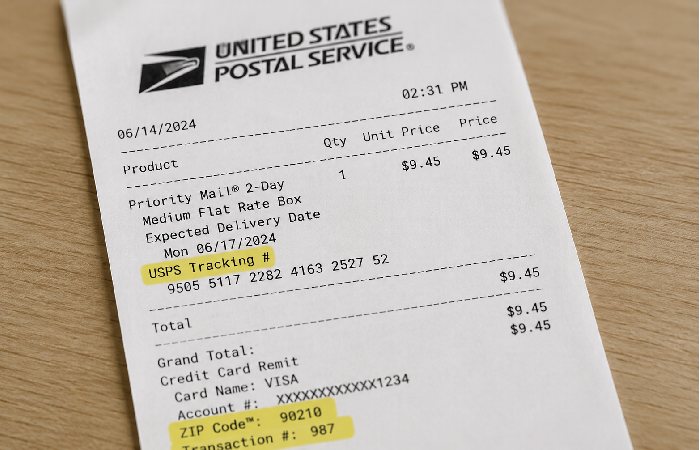
On a typical USPS retail receipt, you’ll usually find:
- Post office name and street address near the top
- The ZIP code for that branch next to the address or in the header line
- The transaction date and time in the middle section
- A small block of survey text or a QR code near the bottom referring to PostalExperience or a “customer experience questionnaire
Receipt Requirements
- Your post office’s ZIP code — printed on the receipt, usually near the store location or at the bottom
- The date of your visit — you’ll need to enter this during the survey
That’s it. You don’t need a special survey code or tracking number for this particular survey. Some other retailer surveys require a unique invitation code — the USPS POS survey doesn’t work that way. You select your post office branch by ZIP code and confirm your visit date.
Remember the receipt has to be recent. The goal of the survey is to get consumers’ opinion about a concrete visit. If the receipt is too old (for example weeks old), the survey system will not identify the combinations of place/date. There is no officially published period of validity e best way to use it is within few days after your visit.
Eligibility Rules
- Must be an 18 years of age or older
-
The survey is directed to US residents who had to use USPS retail services
- One survey response per receipt — you can’t submit multiple times for the same transaction
- USPS employees aren’t eligible to participate
Quick Pre‑Survey Checklist
Before you sit down to take the survey, make sure you have:
- Your USPS retail receipt from a recent in‑person visit
- The zip code and date of visit printed very clearly on the receipt
- A reliable internet connection to your phone, tablet or computer
- 5–10min without a break to go through all questions at once.
If you can’t read the ZIP code or date, or if you’ve lost the receipt, the survey system won’t be able to properly match your visit.
Important aside for those outside of the U. S.: This study is limited to in store observations at U. S. post offices. If you‘re attempting to research the survey outside of the U. S. (say, in India, for example), you may read through the process here, but you will not be able to complete the survey absent proper U. S. post office patronage and receipt.
How to Complete the USPS Survey at PostalExperience.com/Pos
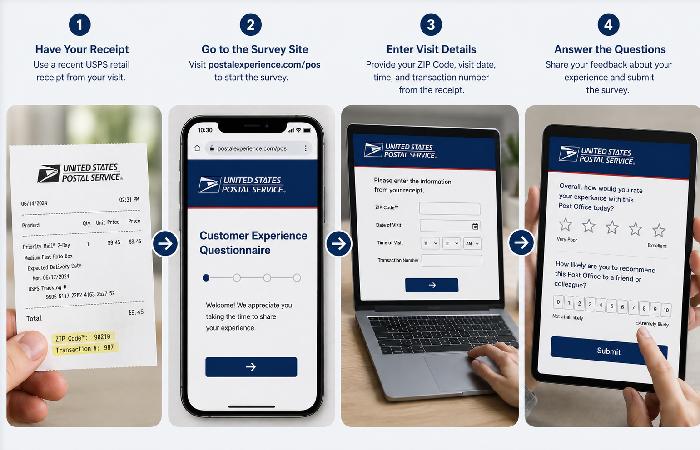
Ever opened a survey link and immediately felt lost? This one’s actually straightforward — no login credentials, no account creation. Here’s the exact flow.
- Go to the official USPS Customer Experience Survey portal in any web browser (phone, tablet, or desktop — all work)
- Select your language preference — the options are English and Spanish (Español)
- Click “Next” — you’ll see a welcome message confirming you’re on the “U.S. Postal Service Customer Experience Questionnaire” site
- Enter the ZIP code printed on your USPS receipt
- Choose the post office branch you used from the list that is shown (some areas have several branches at the same ZIP-code, choose the one you actually used)
- Enter the date of your visit
- Answer the survey questions honestly — they’ll cover topics like overall satisfaction, staff helpfulness, wait times, facility cleanliness, and whether you’d recommend that location
All of that will take 5–10 minutes. Use your mobile device in landscape orientation if the buttons or text are not spaced out enough. The survey is responsive, but a wider view can make multi‑choice questions and progress indicators easier to read.
There’s a progress bar at the bottom of the screen so you can see how far along you are — the survey is typically around 10–16 pages, depending on your responses (some questions trigger follow-up questions based on what you answer).
After you submit, you may be offered an optional sweepstakes entry. More on that below.
Do You Get a Reward for Completing the Survey?
Here’s where you have to be careful about what you read online.
Dozens of third-party blogs claim you’ll “win a $10,000 prize” for completing the USPS PostalExperience survey. Some say “gift coupon.” Others say “sweepstakes entry.” The claims vary — and most of them don’t cite an official USPS source.
| Common Claim | Typical Source | Verifiable From Official USPS Sources? |
|---|---|---|
| “Win $10,000” | Third-party survey blogs | Not prominently confirmed |
| “Free gift coupon” | Affiliate guide sites | Not confirmed on official portal |
| “Sweepstakes entry after completion” | Multiple sources | Likely — survey may offer optional entry, but terms vary |
What can be confirmed: postalexperience.com/pos and the USPS FAQ page for Customer Experience Surveys do not make any specific dollar amount for rewards clear. There may be a voluntary sweepstakes entry when the survey ends, but the conditions, winning number, amount of the first prize, and how you sign up for it change over time and cannot be stated here. Never check the latest PostalExperience survey page for the current sweepstakes and the terms for it.
What should you expect? Fill out the survey simply because you want to share your feelings about your USPS experience. If there‘s a sweepstakes prize at the end of the survey, consider it a bonus and not the point of participating. Also, if any website says you‘re “guaranteed” a prize, beware.
Common Problems and How to Fix Them
Not everything works perfectly on the first try. These are the issues people run into most often.
Survey Page Not Loading
The postalexperience.com/pos page runs on InMoment’s servers. If it’s not loading:
- Try another browser the survey is built with JavaScript and jQuery so ensure you have loaded JavaScript:
- Clear your browser cache and cookies then reload.
- Verify that you are connected to a VPN the survey may not load from ip addresses outside of the US.
- Try again during nonbusy hours (early morning or late evening Eastern Time.
If you are located outside the U. S. Or using a VPN, try turning it off temporarily and refreshing the page. The survey may load more consistently when using a U. S. IP address since USPS focuses most of its marketing efforts on USPS. Com visitors within the United States.
ZIP Code Not Recognized
You entered your ZIP code and nothing came up? Double-check the code against what’s printed on your receipt. And make sure you’re entering the post office’s ZIP code — not your home ZIP code. They might be different.
“Survey Not Available” Error
This generally indicates one of the following. The transaction date may be too old for the system to find a match on, or the survey deployment, by store and date, has expired. USPS periodically rotates survey deployments. If you’re seeing this error, there’s unfortunately no workaround — the survey window for that transaction has closed. (Annoying? Yes. But there’s nothing to be done about it.)
What the Survey Can — and Can’t — Do
The PostalExperience survey is great for:
- Sharing honest feedback about a specific visit
- Highlighting recurring service problems at your local branch
- Helping USPS track satisfaction trends over time
It’s not designed to:
- File formal complaints about lost or damaged packages
- Request refunds, postage adjustments, or delivery holds
- Change your mailing address or manage your USPS account
For those issues, skip the survey and go straight to USPS customer service or the official usps.com tools.
How to Report a Fake USPS Survey
Got an email saying from USPS it wants you to “claim your prize,” “verify your shipping information,” or something else? If it‘s asking you to do anything, don‘t! Here‘s how to handle it:
Report it to the United States Postal Inspection Service federal police for the US Postal Service, who deal with all mail-related crimes including fraud, phishing, and scams. Forward suspicious emails to spam@uspis.gov. Here you will find list of up-to-date scams warning and reporting information, USPS and the Postal Inspection Service listing of scamwarnings pages updated with new phishing schemes when they show up.
- You should change any passwords that you might have used on other sites.
- Keep an eye on your bank statements.
- Deal with one of the three big credit bureaus (Equifax, Experian, TransUnion) by placing a fraud alert.
- If you feel that your personal information has been compromised you can report to identitytheft.gov.
Ongoing Safety Habits for USPS Messages
- Avoid clicking links in unsolicited texts or emails about deliveries or surveys — instead, go directly to usps.com or postalexperience.com/pos in your browser
- Check the full sender address, not just the display name
- Be extra skeptical of messages that combine urgency (“final notice”) with rewards (“you’ve won”) — that pairing is a common smishing and phishing pattern.
The key difference between a real USPS survey and a phishing attempt? The real survey asks about your post office visit. A scam asks for money, passwords, or sensitive financial details. If a “survey” is doing the latter — close the tab.
USPS Contact Information for Survey Support
Having trouble with the survey itself? Here’s who to contact.
| Contact Type | Details |
|---|---|
| Survey support email | postalexperience@inmoment.com |
| USPS general customer service | 1-800-275-8777 |
| USPS survey support phone | 1-800-410-7420 |
| Report mail fraud/phishing | United States Postal Inspection Service |
| USPS official website | usps.com |
Customer service email for the survey (postalexperience@inmoment.com) should be used for problems with the survey itself, such as a page not loading, problems after submitting an survey, or questions about sweepstakes entries. For other questions about postal service, use the customer service number.
Who to Contact for Which Problem
Frequently Asked Questions
Q: Can I take the PostalExperience survey without a receipt?
A: Not really. You can‘t get past the landing screens without the ZIP code and visit date from a USPS retail receipt. If you don‘t have these, you won‘t be able to select a location and the transaction won‘t be matched. Keep the receipt if you‘re planning to give feedback!
Q: Is postalexperience.com the same as postalexperience.com/pos?
A: The base domain (postalexperience.com) is the root site. Adding /pos at the end takes you directly to the Point of Sale survey — the one for retail counter visits. There are other survey types USPS runs under different paths, but /pos is the one printed on retail receipts.
Q: How long does the survey stay open after my visit?
Depends on the survey deployment cycle. USPS doesn’t publish an exact deadline, but the general guideline is to complete it within a few days of your visit. Wait too long — a couple of weeks, say — and you’ll likely get a “survey not available” message. Don’t sit on it.
Q: What languages is the USPS PostalExperience survey available in?
Two: English and Spanish. That’s it. The language selection screen is the very first thing you see when you open postalexperience.com/pos.
Q: Are third-party sites like postal-experience.com or postalexperiencecompos.me safe?
They’re not the official survey. These are independently operated guide websites — they explain how to take the survey and link to the official URL. They aren’t scams in most cases, but they aren’t affiliated with USPS either. For the actual survey, always go directly to postalexperience.com/pos. Type it into your browser yourself if you want to be completely sure.
Q: Does the USPS survey work on my phone?
Yes. The survey is available on desktop computers, tablet computers or a mobile phones. It doesn‘t require an application, just open your mobile browser and go to: postalexperience.com/pos. The system will identify your terminal automatically.
Disclaimer: This guide is published by www.marketingsguide.com for informational purposes. We are not affiliated with, endorsed by, or connected to the United States Postal Service (USPS) or InMoment. For official survey access, always visit postalexperience.com/pos directly.