

You searched for Greblovz2004 Gaming APK, found a dozen different pages — and every single one told you something different. One calls it a free multi-game platform. Another says it’s a casino app. A third describes it as a “line of tech devices for robotics.” And nobody, not one page, can tell you who actually built it.
That’s not a small problem. That’s the whole story.
This guide investigates what Greblovz2004 Gaming APK actually is, why every description contradicts the others, what the real risks are for Pakistani Android users, and which verified gaming options you should consider instead. No download promotions. No vague reassurances. Just what we found.
Table of Contents
Quick Answers Before You Read Further
- What does it claim to be? → A free Android gaming platform with a large game library
- Is it on Google Play Store? → No — manual APK sideloading required
- Can we verify a real developer? → No — zero verifiable developer identity found
- Are version numbers consistent? → No — ranges across different 1.x, 2.x, 3.x and even much higher versions on different sites (major red flag)
- Is it safe? → Cannot be confirmed; proceed with extreme caution
- Best alternative for Pakistani users? → Google Play Games, PUBG Mobile, Free Fire — all verified
How We Researched This
For this guide, we manually checked the Google Play Store for “Greblovz2004”, reviewed the top ranking websites for this keyword, compared their version numbers and feature descriptions, and looked for any verifiable developer website, privacy policy, or official APK hash. We did not find enough evidence to treat this as a normal, trustworthy Android app.
What Is Greblovz2004 Gaming APK? (What It Claims vs. What We Know)
Quick definition: Greblovz2004 Gaming APK is described across multiple websites as a third-party Android application that provides access to a large collection of games from a single platform. It’s not listed on the Google Play Store and has no verifiable official source, confirmed developer, or consistent product description.
That’s the honest 40-word answer. Everything else gets complicated fast.
What It Claims to Offer
Depending on which website you land on, Greblovz2004 Gaming APK is described as offering a diverse game library spanning action, RPG, puzzle, survival, and racing titles. Pages consistently mention a user-friendly interface, multiplayer support, offline play, community features, and — critically — complete free access with no subscription required.
Some sites go further. One describes it as including casino games and arcade challenges with “unrestricted access that bypasses regional restrictions.” Another calls it an open-world RPG with moral choices. A third frames it as a game performance booster — something closer to a utility app than a game library.
So which one is accurate? Honestly, we don’t know. And that’s the problem.
What We Could NOT Verify
Here’s what no website ranking for this keyword can tell you — including the ones that confidently call it “safe”:
- Who built it. There’s no developer name, company registration, or contact page anywhere.
- Where it’s officially distributed. It’s not on Google Play Store, Apple App Store, or Samsung Galaxy Store.
- What the actual package name is. A real app has a consistent package name (like
com.pubg.imobile). No page lists one for Greblovz2004. - What the correct version number is. More on that below.
That’s not minor missing information. Those are the basic facts you’d expect even a free indie app to provide.
Why There Are So Many Different Descriptions Online
Bluntly? Because most of those pages read like generic articles written to target a trending keyword, not reviews based on actually installing and using the app. The descriptions are written to sound plausible, not to document a real, clearly defined product. When you see one site describe it as an RPG and another call it a game booster, it’s not because the app has multiple modes. It’s because different sites wrote different things without any verifiable source to reference.
That distinction matters — especially if you’re deciding whether to download it.
Is Greblovz2004 Gaming APK Safe? Our Honest Investigation
Short answer: we can’t confirm it’s safe, and neither can any page currently ranking for this keyword.
Let’s be specific about why.
Is It Available on Google Play Store?
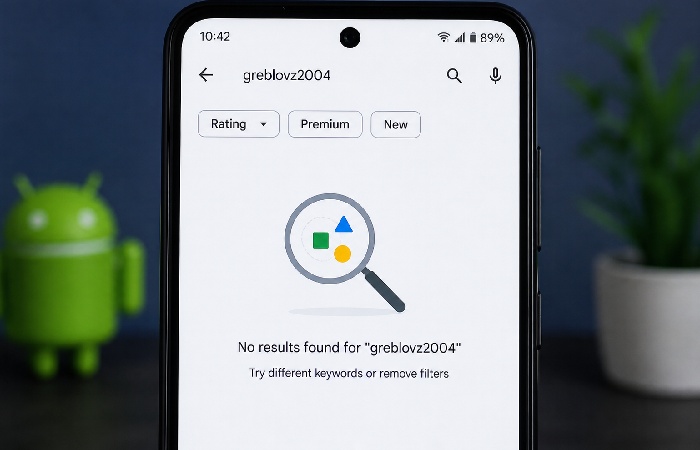
No. Greblovz2004 Gaming APK is not listed on the Google Play Store. We checked — and the absence matters more than most people realize. Apps on the Play Store go through Google’s security review before they appear, and Google’s Play Protect continues scanning them after installation. APKs distributed outside the Play Store skip that entire process entirely. You’re installing something that no independent security body has reviewed.
And there’s no official website that distributes it. The download links scattered across ranking pages point to APK mirror sites, Telegram channels, and file-sharing pages — none of which are the developer’s own platform.
Who Made It? (Developer Identity Check)
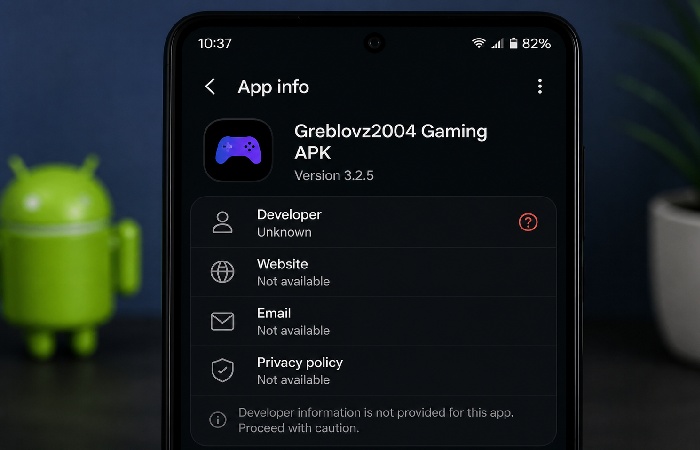
Nobody can answer this. Not a single page covering this APK names a developer, links to a company profile, or references a registered entity. That’s not normal for any legitimate app — free or paid. Even indie game developers on itch.io have a username and a profile page.
No developer identity means no accountability. If the app collects your data, crashes your device, or installs something it shouldn’t, there’s no one to contact and no legal obligation for anyone to fix it.
Version Number Contradictions — A Red Flag
This is arguably the clearest evidence that something is wrong here. Different ranking pages list completely different version numbers — some show 1.x builds, others 2.x or 3.x, and at least one claims a much higher version number, all at roughly the same time.
A real app — even one updated frequently — doesn’t have six completely different version numbers across distribution sites at the same time. This pattern is consistent with SEO‑driven content, where each site seems to be filling in details independently rather than documenting a clearly defined product.
What Pakistan’s Google Play Protect Can Tell You
Google Play Protect will scan apps for malicious activity, even ones installed from outside the Play Store. Before you do anything else to any new unknown APK, unlock the Play Store, tap on the profile icon in the upper right corner and tap Play Protect to run a scan.
If Play Protect flags the APK, treat that as a hard stop.
Potential Risks for Pakistani Users
This section is worth reading carefully — especially if you’re in Pakistan.
Malware and Data Privacy Threats
Any non-Google Play sourced APK is more likely to contain malicious software, spyware, or adware. But ‘more likely’ doesn‘t mean 100% malicious. The big question, then, is whether you can check the file before installing.
With Greblovz2004 Gaming APK? You can’t. There’s no SHA-256 hash published by a developer you can verify. There’s no VirusTotal submission linked from any official source. You’re trusting an unknown file from an unknown person distributed through an anonymous website.
That’s not a level of risk most users would knowingly accept.
Casino and Gambling Content Concerns (PECA Context)
One distribution site explicitly describes this app as offering casino games and arcade challenges with “unrestricted access that often bypasses regional restrictions.” For Pakistani users, that’s not just a content concern — it’s a potential legal one.
Pakistan restricts access to online gambling under existing telecommunications and cybercrime regulations. Using an app that deliberately circumvents those restrictions — whatever the app claims to be — puts you in a grey legal area at minimum.
Legal Risk Under PECA 2016
Out of comfort, let me assume Pakistan‘s Prevention of Electronic Crimes Act (PECA) 2016 covers everything an app does. PECA penalizes all forms of digital activity from unauthorized access and data theft, to publication or circulation of content that offends Article 8 of the Pakistan Penal Code. Downloading an app is not a criminal act per se under PECA, but using an app to avoid regional content, harvest personal information without agreement, or allow access to illegal content could be implicated in howPECA is used to make phone crimes.
This isn’t legal advice — and we’d strongly recommend consulting a local legal professional if you have specific concerns. But it’s context that zero other pages covering this keyword bother to mention.
Financial and Permission Abuse Risks
Some versions of apps like this request permissions well beyond what a gaming app needs — contacts, SMS access, camera, microphone, location. These permissions, once granted, can be used to harvest personal data or, in worse cases, execute financial fraud through SMS-based authentication intercepts.
Check every permission before you tap “Install.” If a gaming app asks for your call logs or SMS messages, that’s a red flag with no legitimate explanation.
Key Features Claimed Online (With Honest Context)
See–this app has great appeal if it‘s true. Big free game library, no ads, play offline, multiplayer. Those are all things that actually are interesting. Now, let‘s see what has been said and what we can really know.
Game Library — Claimed vs. Verifiable
Sites consistently claim Greblovz2004 Gaming APK offers hundreds of games spanning action, RPG, puzzle, survival, and racing genres. But not one page names a specific game title available in the library. No screenshots of the actual game selection exist anywhere in the ranking results.
That’s unusual. A real multi-game platform would have screenshots of its library everywhere.
Multiplayer and Community Features
Multiple pages describe forums, leaderboards, and live chat. One mentions real-time multiplayer battles. But again — no screenshots, no player counts, no verifiable community links (Discord, Reddit, official forums). These could be real features. Or they could be fabricated descriptions written without any first-hand use of the app.
Offline Mode
The offline play claim is one of the more plausible ones. Many Android games do work offline. But whether this specific APK — assuming it functions at all — supports offline mode as described is something we cannot confirm from available evidence.
Ad-Free Experience — Claimed
Several pages say it’s completely ad-free. One page simultaneously mentions a “premium membership” tier for full library access. So it may not be entirely free in practice — or the descriptions may simply contradict each other because they were written independently without testing the product.
How to Install Greblovz2004 Gaming APK in Pakistan (If You Choose To)
Safety Disclaimer: We’re including this section because many users will install it regardless of our recommendations — and a safer installation process is better than a careless one. This is not an endorsement of the download. If you proceed, follow every step below.
Step 1 — Run a Play Protect Scan First
Before you download anything just go into the Google play store on your Android phone, click on your picture in the top right corner, then go to “Play protect” then click “Scan” and run a manual scan. This will check the way your phone is before you begin, and set a ‘marker’.
Step 2 — Enable Unknown Sources
Go to Settings → Security (or Settings → Apps → Special App Access → Install Unknown Apps on newer Android). Find your browser or file manager and toggle “Allow from this source.” On most Pakistani phones — Vivo, Tecno, Infinix — this option is under Security settings.
Do NOT leave this setting enabled after installation. Toggle it off immediately once you’re done.
Step 3 — Download Only From the Least-Risk Source
There‘s no such thing as a ‘safe’ place to download a Trust Edition APK without having it verified. If you‘re going to do it anyway, use somewhere that will at least specify a file size, SHA-256 hash and package name. If all you get is a download button, don‘t bother.
Step 4 — Review Permissions Before Installing
When you open the installation screen, Android presents you with a list of permissions needed by the app. If it asks for SMS, contacts, microphone or location access from a gaming application—abort the installation.
Step 5 — What to Do If You Already Downloaded It
Already installed? Run Android‘s built-in Play Protect scan right now. Review your application‘s battery usage and data usage option if it took up system resources when no using it, uninstall it. Change your Google account password as a precaution, if the app had permission to access the Internet. If while the app was installed you typed any banking, wallet, or OTP codes, contact your bank or wallet service provider and keep a close eye on those accounts.
VERIFY BEFORE YOU INSTALL — 5-Step APK Safety Checklist
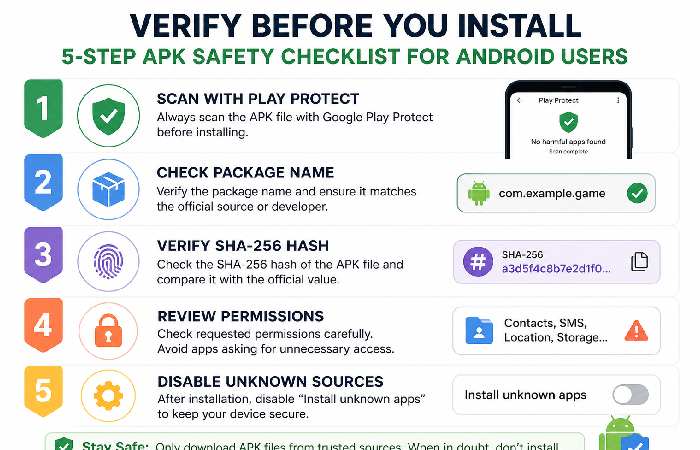
- Play Protect scan — device clean before download
- Package name — check the APK info before installing
- SHA‑256 hash available and verifiable — matches the download source (this lets you confirm the file you scan is the exact same file the site claims to offer, not a modified copy).
- Permissions — no SMS, contacts, or call log access requested
- Unknown sources disabled — don’t leave it open
Security professionals and Android documentation consistently recommend scanning sideloaded APKs with multiple engines and reviewing permissions before installation, rather than relying on a single mirror site’s claims.
Common Mistakes Users Make with Third-Party APKs
Enabling Unknown Sources Without Thinking Twice
Android makes you toggle a security setting before installing third-party APKs. That toggle exists for a reason. It’s not a hurdle to skip past — it’s your phone explicitly asking “are you sure about this?” Treat it like the warning it is.
Trusting Sites That Show Different Version Numbers
Imagine if Site A says 1.1, site B says 2.0 and site C says 3.0 those sites aren’t providing you with the exact same file. You have no real idea of what you‘re downloading. It could be the same thing with a different name three separate files or a trojan horsegame in disguise.
Ignoring App Permissions After Installation
Even once the APK has been installed, look at what permissions it‘s requesting. If a games requests access to your contacts, SMS messages orcamera, that‘s a warning sign. Navigate to Settings->Apps->[Application Name]->Permissions and see what you‘ve given up. Anything that seems like too much, revoke it.
Greblovz2004 Gaming APK System Requirements
Different sites list different requirements — which is itself part of the problem. Here’s what’s been claimed, with notes on where the inconsistencies are:
| Requirement | Claimed (Source A) | Claimed (Source B) | Our Note |
|---|---|---|---|
| Android Version | 5.0+ | 6.0+ | Inconsistent — suggests different APKs |
| RAM | 2 GB | 1 GB | Inconsistent |
| Storage | 100 MB | 50 MB | Inconsistent |
| File Size | 45 MB | 22 MB | Inconsistent |
| Internet Required | Optional (offline mode) | Required | Directly contradictory |
| iOS Support | No | Yes (one site claims) | Almost certainly false — APKs don’t run on iOS |
For a normal, legitimate app, basic requirements like Android version, RAM and file size are usually consistent across sources. Here, the differences suggest that not every site is describing the same file or build.
The iOS claim (from one site) is worth noting. APK files are an Android‑exclusive format and don’t run on iOS at all. Any site claiming this APK works on iPhones is simply incorrect.
Greblovz2004 Gaming APK vs. Legitimate Alternatives for Pakistan
Here’s the honest comparison. These are verified apps available on Google Play Store right now — tested by millions of Pakistani users on the exact phones (Vivo, Tecno, Infinix, Samsung) most common in the market.
| Feature | Greblovz2004 APK | PUBG Mobile | Free Fire | Google Play Games |
|---|---|---|---|---|
| Google Play Store listing | ❌ No | ✅ Yes | ✅ Yes | ✅ Yes |
| Verified developer | ❌ Unknown | ✅ Krafton | ✅ Garena | |
| Free to play | ❓ Claimed | ✅ Yes | ✅ Yes | ✅ Yes |
| Works on Vivo/Tecno/Infinix | ❓ Unverified | ✅ Confirmed | ✅ Confirmed | ✅ Confirmed |
| Offline mode | ❓ Claimed | Partial | Partial | Partial |
| Malware scan passed | ❌ None available | ✅ Play Protect cleared | ✅ Play Protect cleared | ✅ Play Protect cleared |
| Jazz/Zong data friendly | ❓ Unknown | ✅ Low data mode | ✅ Low data mode | ✅ Adjustable |
| Safe under PECA context | ❓ Disputed | ✅ Yes | ✅ Yes | ✅ Yes |
Best Free Gaming Apps on Google Play Store for Pakistan
- PUBG Mobile — The most-played mobile game in Pakistan. Verified, constantly updated, free, and optimized for low-end Android devices. Uses around 1.8–2.5 GB storage.
- Free Fire — Built specifically for low-RAM, low-storage Android phones. This is probably the best option if you’re running a Tecno or entry-level Vivo. Under 1 GB, plays on 1 GB RAM devices.
- Google Play Games — Google’s own gaming platform. Has hundreds of casual titles, all Play Protect verified, all free. Honestly, this is the closest thing to what Greblovz2004 claims to be — but legitimate.
Which One Should Pakistani Users Choose?
For competitive multiplayer: PUBG Mobile or Free Fire. Both work on Jazz 4G, Zong, and Telenor connections with low-latency settings available. For a casual multi-game library: Google Play Games. It’s free, verified, and you won’t have to enable unknown sources to use it.
Pros and Cons (Honest Assessment)
| Pros (As Claimed) | Cons (Verified) |
|---|---|
| Large claimed game library | No verifiable game list or screenshots |
| Free — no subscription claimed | One source mentions a premium tier |
| Offline play claimed | Directly contradicted by other sources |
| Lightweight on low-end phones (claimed) | File size varies from 22 MB to 100 MB depending on source |
| Community features claimed | No verifiable community links exist |
| Ad-free claimed | Cannot confirm — no tested user reports |
| — | No Google Play Store listing |
| — | No verified developer identity |
| — | Version numbers inconsistent across sites |
| — | Potential PECA legal exposure (casino content claim) |
| — | Cannot run VirusTotal verification from any official source |
Who Should Consider It vs. Who Should Avoid It
Potentially worth exploring — with full caution — if:
- You’re a technically experienced Android user who can manually check APK package names, verify permissions in detail, and run your own malware scan
- You understand and accept the risk that the app may not be what any website claims it is
- You have a secondary device you can test it on, separate from your primary phone
Avoid it — clearly — if:
- Your phone contains banking apps, personal photos, contacts, or saved passwords
- You’re under 18 or using a shared family device
- You’re in Pakistan and concerned about legal exposure under PECA
- You have limited mobile data (Jazz, Zong, Telenor) and can’t afford to troubleshoot a problematic install
- You’re not comfortable with the idea that nobody knows who built this app
That second list is probably most Pakistani users. And that’s a fair thing to say plainly.
Frequently Asked Questions
Q: What is Greblovz2004 Gaming APK used for?
A: Claimed purpose varies by source — some describe it as a multi-genre game library, others as a game performance booster, and at least one as a casino platform. There’s no single verified answer, because there’s no verified developer to confirm what the app actually does.
Q: Is Greblovz2004 Gaming APK safe to download in Pakistan?
A: We can’t confirm it’s safe — and honestly, that’s the clearest answer available. No security scan results exist from a verifiable source, no developer identity has been established, and some distribution sites link it to gambling content that creates additional legal risk under Pakistani law. The absence of a Play Store listing means it skips Google’s malware review entirely.
Q: Is it available on Google Play Store?
A: No. Not listed. We checked directly. Any site telling you otherwise is wrong.
Q: Can I use it on iOS or PC?
A: APK files are Android-exclusive. They don’t install on iOS or standard Windows PCs without specialized emulation software (like BlueStacks on PC). One ranking site claims it works on iOS — that claim is almost certainly false, and the fact that a site makes it tells you something about how carefully they’ve verified anything else they wrote.
Q: What happens if I already downloaded Greblovz2004 Gaming APK?
A: Do a Play Protect scan now directly from the Google Play Store. See what permissions it has in Settings -> Apps -> [App Name]-> Permissions. If it has permissions to access your SMS, contacts, or microphone revoke those right now and change your Google account password. If you see background data or battery use you don‘t recognize uninstall it.
Q: Are there legal consequences for downloading pirated APKs in Pakistan?
A: PECA 2016 covers unauthorized access and cyber-enabled offences, but personal APK downloads generally aren’t the primary enforcement focus. The bigger concern for Pakistani users is apps that bypass regional content restrictions (like gambling platforms) — those create clearer exposure. If you have specific concerns about your situation, a qualified lawyer in Pakistan can give you accurate guidance, not a blog post.
Q: Which legitimate gaming apps should I use instead?
A: PUBG Mobile and Free Fire for competitive multiplayer — both are extensively used by Pakistani gamers and work well on common local devices and networks. For casual multi-game access, Google Play Games is the closest verified equivalent to what Greblovz2004 claims to offer.
Final Verdict for Pakistani Users (2026)
Here’s where we land after looking at every page ranking for this keyword, checking version claims, searching for developer information, and reading through every feature description available.
Greblovz2004 Gaming APK cannot be verified as a legitimate, safe, or consistently described product. The version numbers don’t match. The product descriptions don’t match. No developer exists on record. The app isn’t on any official store. And at least one distribution site describes it as a casino platform that bypasses regional restrictions — which isn’t just a safety concern, it’s a potential legal one for Pakistani users.
This doesn‘t imply that the APK is inactive, or that those who have installed or used it haven‘t had a good one. But it means that you‘re putting yourself in a position where you‘re unable to forsee the consequences of your actions, for an application which whose purpose you can‘t be sure of, from someone who‘s definitely not seen lack of accountability.
For most Pakistani users — especially those using shared devices, banking apps, or limited data plans — the verified alternatives (PUBG Mobile, Free Fire, Google Play Games) deliver everything a legitimate gaming platform should, without any of these concerns.
Share this guide with someone you know who is searching for this app. The more people who understand what’s actually behind this keyword, the fewer people will make a decision based on misleading information.
Everything Greblovz2004 Gaming APK claims to offer — free games, multiplayer, offline play — is already available through verified apps on the Google Play Store. You’re not missing out on anything essential by avoiding this APK, but you are avoiding unnecessary risk.
Last Updated: May 3, 2026 | Researched and written by the marketingsguide.com editorial team | This article is for informational purposes only. For legal guidance on digital regulations in Pakistan, consult a qualified legal professional.
About the Author
Abdul Rahman is a content strategist and digital marketing expert with over 4 years of experience writing researchbased articles from a variety of niches including health, beauty, technology, and online marketing. He‘s passionate about translating difficult and“clinical“subjects into easytounderstand and actionable blueprints so the reader is confident they are making the right decision while not being overwhelmed with technospeak.
Published by: [www.marketingsguide.com], a quality editorial site focused on providing people-first, reliable and factual content to assist users in learning, comparing and making informed decisions on their day-to-day activities.